
⚠️Not updated in over 2 years ⚠️Below average rating
Description
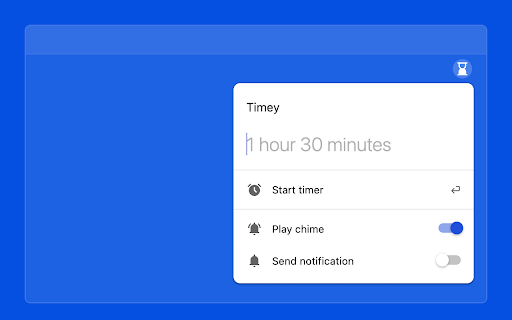
Timey is a simple and easy-to-use countdown timer extension. No need to fiddle with controls – with Timey, all you need to do is type in the desired time or duration and press enter. Once the timer reaches zero, Timey will emit a chime to let know your timer is complete.
Usage:
1. Install the extension.
2. Click on the extension icon located in your browser toolbar or use the Command/Ctrl+Shift+Y shortcut to open the extension popup.
3. To set a timer, type a time or duration into the input and press "Start timer" or hit the Enter key.
4. Once your timer is complete, Timey will emit a chime or send an optional notification.


Reviews
Loading reviews...
Permissions (4)
Permissions
alarmsℹ Can schedule periodic background tasks notificationsℹ Can show desktop notifications offscreen storageℹ Can store data locally in your browser
Details
| Version | 1.0.5 |
| Updated | Jul 1, 2023 |
| Size | 45.76KiB |
| First Seen | Mar 22, 2026 |
Popular in workflow

Adobe Acrobat: PDF edit, convert, sign tools
by Adobe Inc.
330M
★ 4.40
workflow
330M
★ 4.40
workflow

Chrome Remote Desktop
by Chrome Remote Desktop Release Managers
38M
★ 3.14
workflow
38M
★ 3.14
workflow

Microsoft Power Automate
by Microsoft Corporation
10M
★ 1.99
workflow
10M
★ 1.99
workflow

Screencastify - Screen Video Recorder
by castify-ext-dev
9M
★ 3.95
workflow
9M
★ 3.95
workflow

iCloud Bookmarks
by Apple Inc.
7M
★ 3.38
workflow
7M
★ 3.38
workflow
Popular Extensions
Adobe Acrobat: PDF edit, convert, sign tools
by Adobe Inc.
330M
★ 4.40
workflow
330M
★ 4.40
workflow
Chrome Remote Desktop
by Chrome Remote Desktop Release Managers
38M
★ 3.14
workflow
38M
★ 3.14
workflow

Cisco Webex Extension
by cisco.chromestore
24M
★ 2.34
social
24M
★ 2.34
social

Kami for Google Chrome™
by Kami
17M
★ 4.56
education
17M
★ 4.56
education

Read&Write for Google Chrome™
by Texthelp
17M
★ 3.44
accessibility
17M
★ 3.44
accessibility