
⚠️Requests 1 sensitive permission
Description
Promptaa: AI Prompt Engineering and Prompt Library
Upgrade your AI workflow with Promptaa, the chrome extension designed to help you save, organize, and engineer your prompts, all in one place.
Whether you're a developer, marketer, content creator, or just exploring AI prompt engineering, Promptaa gives you the tools to manage your most effective prompts like a pro. It's a prompt library and prompt engineering tool designed to help you save time.
✨ Features You’ll Love:
🪄 Improve prompt quality with one-click prompt engineering
🧠 Save and reuse your best AI prompts
🗂️ Organize prompts by categories
⚡ One-click insert into ChatGPT and other AI tools
We hope you love it as much as we do!
Instructions:
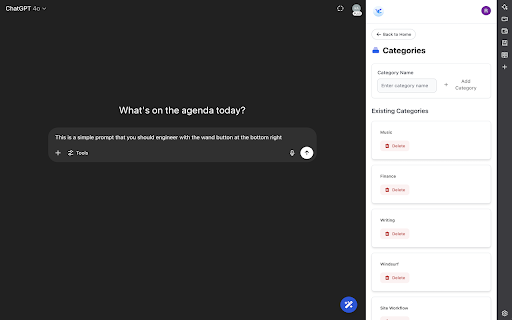
After installing, there are two main elements to interact with.
1. The AI enhance button located in the bottom right of the window.
Use: AI enhance prompts on any site where you use AI. This button has two other buttons that will appear once hovered over, the XML enhance button, and the "save prompt" button, which will copy the prompt over for you to save for later re-use.
2. The side-panel, which is opened by clicking the extension icon once installed.
Use: This has your prompt libraries. You can create categories, as well as create and re-use prompts after you've logged in.
Everything between the chrome extension and the web app are synced.
Website: https://promptaa.com


Reviews
Loading reviews...
Permissions (5)
Permissions
cookiesℹ Can read and modify browser cookies identityℹ Can use your Google account identity sidePanel storageℹ Can store data locally in your browser tabsℹ Can see your open tabs and their URLs
Details
| Version | 0.1.0 |
| Updated | Jul 31, 2025 |
| Size | 3.4MiB |
| First Seen | Mar 22, 2026 |
Popular in tools

Microsoft Bing Homepage & Search for Chrome
by Microsoft Corporation
4M
★ 3.72
tools
4M
★ 3.72
tools

Monica: All-In-One AI Assist & Smartest AI Agent
by Monica Team
3M
★ 4.89
tools
3M
★ 4.89
tools

Ad Blocker: Stands AdBlocker
by Stands
3M
★ 4.79
tools
3M
★ 4.79
tools

Google Dictionary (by Google)
by dictionary-extension-dev
3M
★ 4.36
tools
3M
★ 4.36
tools

WPS浏览器助手:文档在线阅读编辑
by 金山PDF
2M
★ 2.90
tools
2M
★ 2.90
tools
Popular Extensions

Adobe Acrobat: PDF edit, convert, sign tools
by Adobe Inc.
330M
★ 4.40
workflow
330M
★ 4.40
workflow

Chrome Remote Desktop
by Chrome Remote Desktop Release Managers
38M
★ 3.14
workflow
38M
★ 3.14
workflow

Cisco Webex Extension
by cisco.chromestore
24M
★ 2.34
social
24M
★ 2.34
social

Kami for Google Chrome™
by Kami
17M
★ 4.56
education
17M
★ 4.56
education

Read&Write for Google Chrome™
by Texthelp
17M
★ 3.44
accessibility
17M
★ 3.44
accessibility