Replay It - Video Delay Tool icon

Replay It - Video Delay Tool

by ConnectedPE

v2.0.26 Updated Mar 12, 2026 90.23KiB
CWS
3K
Users
★ 3.67
9 reviews
#2721
of 49.1K
tools
#533 of 12.2K
Recently updated

Description

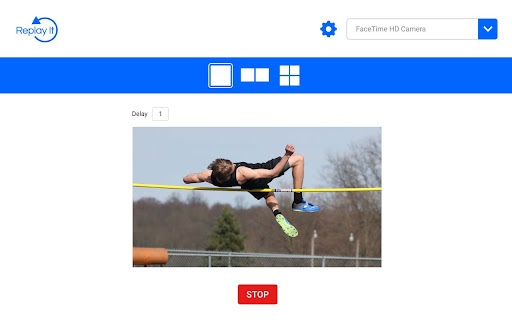
Introducing Replay It, the first-ever video delay application designed specifically for Google Chrome. This user-friendly yet robust real-time video analysis tool empowers you to evaluate and enhance your own performance, as well as that of your students or athletes, in various sporting activities. With Replay It, you can record videos and play them back seamlessly after a short time delay, enabling immediate, hands-free visual feedback. Effortlessly review your performance or that of your students on your laptop or Chromebook, without having to press any buttons. Our multiscreen support feature allows you to set varying delay values and watch a performance multiple times, making Replay It an invaluable resource for sports coaches, physical education instructors, dancers, students, and more. Looking for training, support, and inspiration for your PE program? Visit replayitapp.com to access a wealth of teacher and student resources tailored to help you make the most of our cutting-edge video delay application.
Replay It - Video Delay Tool screenshot 1Replay It - Video Delay Tool screenshot 2Replay It - Video Delay Tool screenshot 3Replay It - Video Delay Tool screenshot 4

Reviews (3 cached)

★☆☆☆☆2024-12-01
Julio Rodríguez

Be careful, this scammer will try to charge you a lot of money for using his trash.

★★★☆☆2025-09-02
Viet-Tam Luu

Feels overpriced for what it is. No playback controls, no zoom, no telestration tools. I don't even need most of those features, but the app layout is extremely suboptimal: the video display only uses a small fraction of the screen, and I wanted to use this on a 10" ChromeOS tablet so I didn't have that much screen to begin with. If I could only maximize/fullscreen the video then I might give this app some consideration; as it is, it really won't meet my needs. EDIT: thanks to reviewer Rasius Malskaitis for pointing out you can fullscreen the video it by enabling the video controls.

★★★☆☆2024-07-29
Rasius Malskaitis

Kind of works, but lacks some essential functions/settings: - No fullscreen mode. You can workaround by enabling full controls on video rightclick, but button would be nice. - Camera settings absolutely need Flip video on/off setting. As I understand, current implementation flips it by default, and it makes video useless when tablet is in portrait mode(I.e. video is upside down). Hope developers will take it into account.

Permissions (3)

Permissions

alarms Can schedule periodic background tasks downloads Can manage and monitor downloads storage Can store data locally in your browser

Details

Version 2.0.26
Updated Mar 12, 2026
Size 90.23KiB
First Seen Mar 22, 2026



