
Description
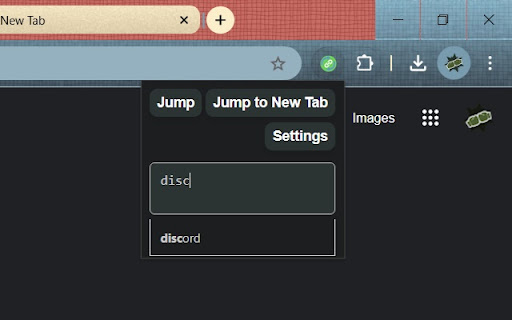
Allows mapping `name URL` pairs as search shortcuts. By default, `Alt+M` opens the extension for redirecting the current window and `Alt+N` opens the extension for URL jumping onto a new tab. Typing `name` in the popup text box and entering will take you to `URL`. `name URL` pairs can be set in the settings page. You can also write comments along with your `name URL` pairs by using \ (a backslash).
Use cases:
- You have an IP address URL that you want to connect to: "dashboard http://192.168.1.136:8083"
- You want to use generic and short names: "benefits https://www.manulife.ca/personal.html"
GitHub repository:
https://github.com/BrianWeiHaoMa/URLJumper
If you find any bugs, or think that another feature would be worth it to add, please
don't hesitate to open up an issue or a pull request on the GitHub repository.
Developers:
Brian Wei Hao Ma, Ryan B. Green


Reviews
Loading reviews...
Permissions (3)
Permissions
activeTabℹ Can access the current tab when you click the extension commands storageℹ Can store data locally in your browser
Details
| Version | 1.0.5 |
| Updated | Dec 16, 2025 |
| Size | 44.71KiB |
| First Seen | Mar 22, 2026 |
Popular in functionality

Infinity New Tab
by Infinity Teams
400K
★ 4.57
functionality
400K
★ 4.57
functionality

Go Back With Backspace
by gobackwithbackspace
300K
★ 3.16
functionality
300K
★ 3.16
functionality

Google Search Maps Button
by Publisher54321
200K
★ 4.81
functionality
200K
★ 4.81
functionality

Disable AI Overview | Turn Off AI Overview
by hideaioverviews
100K
★ 4.06
functionality
100K
★ 4.06
functionality

IPvFoo
by Paul Marks
100K
★ 4.82
functionality
100K
★ 4.82
functionality
Popular Extensions

Adobe Acrobat: PDF edit, convert, sign tools
by Adobe Inc.
330M
★ 4.40
workflow
330M
★ 4.40
workflow

Chrome Remote Desktop
by Chrome Remote Desktop Release Managers
38M
★ 3.14
workflow
38M
★ 3.14
workflow

Cisco Webex Extension
by cisco.chromestore
24M
★ 2.34
social
24M
★ 2.34
social

Kami for Google Chrome™
by Kami
17M
★ 4.56
education
17M
★ 4.56
education

Read&Write for Google Chrome™
by Texthelp
17M
★ 3.44
accessibility
17M
★ 3.44
accessibility