
Vocabulary Builder – Translate with context & Save Words | VocabKit
by Oryx Data
v0.1.5 Updated Feb 12, 2026 375KiB
Description
Stop switching tabs every time you meet a new word. VocabKit turns any webpage, article, PDF, or video into an interactive language lesson so you can translate in context, save vocabulary, and keep learning while you browse—without breaking your focus.
A language learning extension and vocabulary builder: translate selected text on-page, without switching tabs, then save words to your vocabulary list.
🌍 40 Languages, 1,560 Translation Pairs
Spanish, French, German, Japanese, Korean, Chinese (Simplified & Traditional), Arabic, Portuguese, Italian, Russian, Hindi, Turkish, Vietnamese, Thai, Dutch, Polish, Swedish, Indonesian, Greek, Hebrew, Czech, Danish, Finnish, Hungarian, Norwegian, Romanian, Ukrainian, Bengali, Tagalog, Malay, Persian, Swahili, and more!
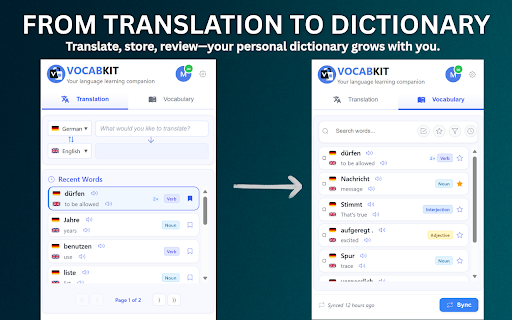
Translate text with one click, save words to your personal vocabulary list, and export them (Anki or CSV). This is the simplest way to build a vocabulary from real content.
✨ Key Features
⚡ Instant On-Page Translation (Alt+T)
• Select a word or phrase and get a clean, context-rich translation without switching tabs. Works on websites, articles, and documents.
🎯 OCR Translation for Images & Subtitles (Alt+O)
Translate text from ANY image or video frame, including hardcoded subtitles. Perfect for:
• Streaming shows with burned-in subtitles (e.g., Netflix/Disney+ content)
• YouTube videos without captions
• Screenshots, memes, and social media images
• Scanned documents and PDFs
🧠 Deeper Contextual Learning
• Go beyond definitions: part-of-speech, example sentences, and meaning nuances to help you remember words naturally.
📚 Smart Vocabulary Builder (Save Words in 1 Click)
• Save new words to your personal library. Review and manage your vocabulary directly in the extension with cloud sync across devices.
✍️ Personal Notes & Mnemonics
• Add your own notes to make vocabulary stick.
📤 Export Your Vocabulary (Anki / CSV)
• Export as APKG (direct Anki import) or CSV for other spaced-repetition workflows.
🗣️ Clear Pronunciation (Text-to-Speech)
• Listen to audio for both the original word and the translation.
📺 Learn from Videos
• Turn entertainment into learning: translate on-screen text and subtitles while watching videos online (OCR mode supports hardcoded subtitles).
🖼️ PDF & Image Support
• OCR extracts text from visuals so you can translate and learn even when text isn’t selectable.
⌨️ Keyboard Shortcuts
Alt+T — Translate selected text instantly
Alt+O — OCR mode for images, videos, and screenshots
Alt+L — Open your vocabulary list
🚀 How It Works (3 Steps)
1️⃣ SELECT: Highlight any word or phrase
2️⃣ TRANSLATE: Press Alt+T (or click the VocabKit icon)
3️⃣ SAVE: Add it to your vocabulary list for review and export
💰 Pricing
• FREE — 30 translations/day, vocabulary saving, cloud sync
• PREMIUM (€6.99/month) — Unlimited translations, unlimited OCR, advanced features, priority support
• ✓ 7-day free trial available
✅ Perfect For…
• Language learners who want to learn from real content
• Readers building vocabulary from news, blogs, and articles
• Students and researchers reading papers in another language
• Professionals working with multilingual websites and documents
• Video watchers translating on-screen text and subtitles
• Anyone who wants a simple translate + save vocabulary workflow
🛡️ Privacy and Trust
VocabKit respects your privacy:
• No browsing history tracking (activates only when you select text)
• Your vocabulary list stays private and is never sold
• Minimal permissions requested only
• GDPR-friendly approach
Privacy Policy: https://vocabkit.web.app/privacy
🎯 Ready to build vocabulary faster?
Click “Add to Chrome” and start with free daily translations.
Questions? support@vocabkit.app



Reviews
Loading reviews...
Permissions (6)
Permissions
activeTabℹ Can access the current tab when you click the extension contextMenusℹ Can add items to the right-click menu downloadsℹ Can manage and monitor downloads notificationsℹ Can show desktop notifications storageℹ Can store data locally in your browser tabsℹ Can see your open tabs and their URLs
Details
| Version | 0.1.5 |
| Updated | Feb 12, 2026 |
| Size | 375KiB |
| First Seen | Mar 22, 2026 |
Popular in education

Kami for Google Chrome™
by Kami
17M
★ 4.56
education
17M
★ 4.56
education

Language Reactor
by Dioco
2M
★ 4.20
education
2M
★ 4.20
education

Speechify — Text to Speech
by Speechify
1M
★ 4.59
education
1M
★ 4.59
education

xFanatical Safe Doc
by xFanatical
700K
★ 1.46
education
700K
★ 1.46
education

GPTZero: AI Detection & Writing Replay
by chrome-extension-publisher
400K
★ 4.57
education
400K
★ 4.57
education
Popular Extensions

Adobe Acrobat: PDF edit, convert, sign tools
by Adobe Inc.
330M
★ 4.40
workflow
330M
★ 4.40
workflow

Chrome Remote Desktop
by Chrome Remote Desktop Release Managers
38M
★ 3.14
workflow
38M
★ 3.14
workflow

Cisco Webex Extension
by cisco.chromestore
24M
★ 2.34
social
24M
★ 2.34
social
Kami for Google Chrome™
by Kami
17M
★ 4.56
education
17M
★ 4.56
education

Read&Write for Google Chrome™
by Texthelp
17M
★ 3.44
accessibility
17M
★ 3.44
accessibility