
Description



Reviews (30 cached)
Sorry, just, no.
Linking device doesn't work, importing from another app doesn't work, I'll just stick with Stratum Authenticator, thank you.
I have received notification browser extension data error.
I don't understand use cases. I don't want to use my phone, but extension demand to use it. It's useless. We already have auth app from Google.
Notifications take long to receive the notification, and why on earth do I need to reach to my phone to approve the code? it takes me same time and effort to open the app and type the code myself!!! Why not the extension generate and insert code straight away?! I have already approved the extension during the setup process!!
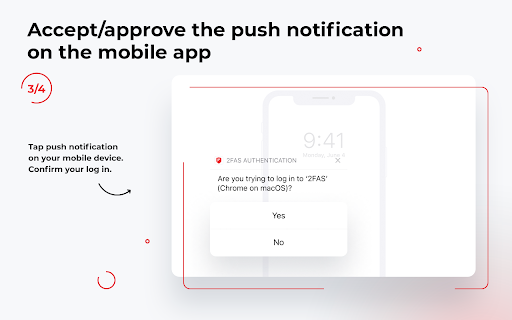
Requires a lot of steps to install and configure and doesn't work anyway. Can't work on itself requires a mobile app. The whole process is idiotic, instead of saving those tokens locally to generate OTP, it sends a push request to your phone, where you need to confirm and then it supposed to send OTP back or something. The last part never worked though, so I am guessing.
Never sends a push notification to my phone after linking. Doesn't work
The connection doesn't even pairing with phone app (on Android)
Awful! horrible! terrivel! It is just an extension to COPY the codes generated in the mobile app! WHY IN THE HELL ANYONE WOULD NEED THAT? JUST SEND IT THROUGH WHATSAPP / SMS / WHATEVER TO YOURSELF INSTEAD!!!
Almost never get the push notification on my phone. On the rare occasion that it does work it will only pop up 5 or 10 minutes later.
Doesn't work at all. The onboarding video and what actually happens when you install this extension have nothing in common. It keeps popping an access request on my mobile 2FAS app, so that I can't use it, no matter how many time I approve the access it's asking for. And the chrome extension basically does nothing.
Garbage. It brings up app in mobile phone then does nothing. What's the point?
Still requires you to use your phone every time, what is the point then?
Sorry but this is exactly what I would not want from an extension. Was hoping this would allow me to see and copy token codes rather than perform tricks in order to eventually paste wrong account's token into the login screen after having to deal with popups on Android. This is by no way quicker or easier than already existing solutions from Redmond or Mountain View.
Was about to migrate from the now-defunct desktop version of Authy to this, but the lack of support for a standalone desktop use made me look for some other alternatives.. I mean, still needs a phone if you're installing it on a PC?!
What's the point of a desktop extension if I still need my phone? At least I can export away, unlike Authy.
EVERY TIME I have to go reply to a prompt on my phone. So if I don't have my phone at hand, I am SOL. The "Remember my decision" button is just a placebo, I guess. Super awkward to use even when I do have the phone here.
For past 1 week, I used this extension but android app first when my work mobile died randomly and for 6 days, all my stuff including logins and 2fas were gone (fortunately everything's back as IC issue was resolved). I was using Aegis Authenticator app so opted for 2FAS Authenticator app due to cloud backup and addon support but this addon is useless even if you link it with app as if you lose device and want to login into any website, you cannot since it relies on mobile to get 2fa codes. Backups (both encrypted and unencrypted) from several apps like Aegis fails to get imported but dev thinks it is problem with my backup file. The site favicons are letters or wrong icons. It considers Amazon and MS outlook to be same with same icon and letter. Also, I tried all methods to check how far this addon works standalone if anything happens to my mobile and found it is best to use winauth authenticator (which still works strong despite being discontinued) or get a secondary cheap phone (but no guarantee that will work if you don't carry with it all the time). Also, when you try to enter codes with app and addon activated and linked, it doesn't add it once, you need to go through 3 timers to get it entered with no success. Hey dev, please tell us where does this addon stands if it relies on mobile and if mobile stops working one day with which it is linked? I really could love this due to its colors but in terms of functionalities, bugs and usability, it still needs serious work. One cannot even add this as PWA. I couldn't find this in edge addon store or firefox addon store. Will wait for a month more for dev to improve this realistically before going back to Aegis or Authenticator Pro or ente Auth - 2FA Authenticator. More, Hey dev, Learn from WinOTP Authenticator, https://apps.microsoft.com/detail/9NF2RGQKX1MV?hl=en-us&gl=US and, WinAuth Authenticator, https://winauth.github.io/winauth/index.html
For some reason I am not able to scan this code. Tried manually to enter the code characters and nothing. Same applies to MS Edge web store.
Doesn't work for me...
Absolutely terrible extension lacking almost every essential feature required to make it function. Each prompt requires you to accept the request from your phone first before being granted access to the token. However, even then, you still face issues actually accessing the 6-digit code. This is the most ridiculous extension I have seen to date, and I cannot believe that 2FAS is responsible for creating and publishing this app!
I am trying to log in to GitHub. I am using the brave browser. My android phone is paired to this extension via the 2fas Auth app. Upon receiving the browser request on the phone, I am told to 'add services to the 2FAS app'. What services are or how to add them to the app is nowhere to be found. Conclusion: The whole process is not working. Case closed.
i cant login, due to this the app crashes. Also please stop putting fake reviews. thanks
sorry not for me, still requires me to pick up the phone.
I wish the browser extension allowed you to view all of your 2FA codes and copy any one of them by clicking a button next to it, essentially being a mirror of the phone app. Right now it's too inconvenient, doesn't always recognize a text field and only works in the browser. If you won't make a dedicated desktop app, at least allow us to view all our codes in the extension, or else what's the point of having it? Still better than Authy though, and I'll be glad to update my review if the devs satisfy this request.
It is unable to detect text field. I have to check on phone and type the damn otp 95% of the time. It would be better if it could show the otp on desktop as well.
No longer works in Arc Browser.
Unfortunately, this extension is useless. I synced it with the Android app using the QR cod. It appears in the paired devices on the Android app, but when I click the button in the desktop browser, nothing happens. It only displays the notification that a push was sent to the Android app, but nothing appears in the Android device.
Works great, but you still have to pull out your phone. Not much benefit for those of us who aren't valuable targets. Request a "mere mortals" mode, where it doesn't prompt on phone.
In not having a desktop app, I was hoping this extension would be an adequate substitute. Unfortunately the extension is merely a relay to acquire the TOTP from your nearby mobile device. So a minor convenience but not a solid substitute for a desktop app.
Permissions (6)
Permissions
Details
| Version | 1.8.0 |
| Updated | Jan 20, 2026 |
| Size | 5.24MiB |
| First Seen | Mar 22, 2026 |
Popular in privacy




Popular Extensions




