
Description
Unlock the Power of Google's Gemini AI - Anytime, Anywhere!
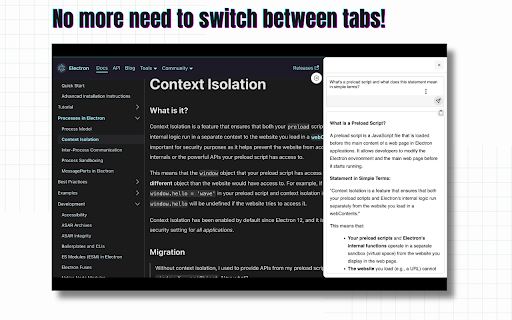
Elevate your browsing experience with Ask Gemini, the ultimate Chrome extension that brings Google's advanced Gemini AI to your fingertips. With just one click, access the latest conversational AI technology directly from any webpage, without disrupting your workflow or requiring multiple tabs.
Why Choose Ask Gemini?
* Convenience: Instantly access Gemini AI without switching tabs or losing your place on the current page.
* Speed: No more delays or interruptions - answer your questions quickly and efficiently.
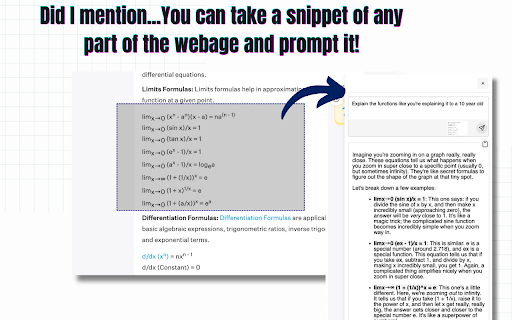
* Contextual: You can prompt Ask Gemini based on the context of your selected text from any webpage, providing more accurate and relevant responses.
* Advanced Technology: Leverage Google's cutting-edge AI capabilities to get answers, insights, and suggestions on a wide range of topics.
What Can You Do with Ask Gemini?
* Answer complex questions and get in-depth information on various subjects.
* Explore new topics and discover interesting facts and insights.
* Get writing suggestions, grammar corrections, and language translation assistance.
* Enhance your research skills and stay up-to-date on the latest developments in your industry.
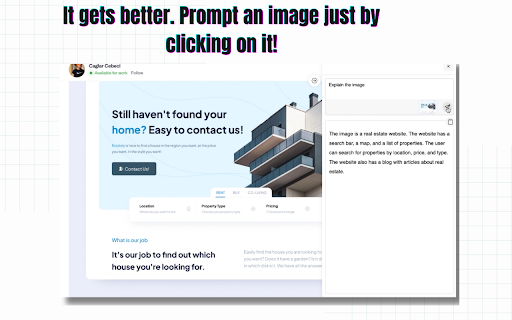
* Prompt using an Image in just one click!
Get Started Today!
Download Ask Gemini now and experience the power of Google's Gemini AI in a convenient, one-click solution. Say goodbye to tab-switching and hello to a more streamlined, AI-powered browsing experience.
Reviews (5 cached)
★☆☆☆☆2026-03-05
AMOS
greyed out. cant use
★☆☆☆☆2025-10-09
Dionis Espaillat
copy text did not work, wasted alot of time hunting down script errors. Where do i send the bill?
★☆☆☆☆2025-09-14
Ruslan Tleubaev
Set api key and nothing happened. Press the button and nothing happens does work or not?
★★☆☆☆2025-07-30
Benjmain Griffiths
Useful, but I think there should be a sidebar and native support.
★★★☆☆2025-05-23
Kate Nerenberg
I thought that it can automatically see what's on the tab you have open, but when I wrote for example "summarize this article for me" on a CNN page, it asked me to enter the link to the article. Maybe I'm doing something wrong?
Permissions (3)
Permissions
activeTabℹ Can access the current tab when you click the extension contextMenusℹ Can add items to the right-click menu storageℹ Can store data locally in your browser
Details
| Version | 1.7 |
| Updated | May 14, 2025 |
| Size | 1.43MiB |
| First Seen | Mar 22, 2026 |
Popular in tools

Microsoft Bing Homepage & Search for Chrome
by Microsoft Corporation
4M
★ 3.72
tools
4M
★ 3.72
tools

Monica: All-In-One AI Assist & Smartest AI Agent
by Monica Team
3M
★ 4.89
tools
3M
★ 4.89
tools

Ad Blocker: Stands AdBlocker
by Stands
3M
★ 4.79
tools
3M
★ 4.79
tools

Google Dictionary (by Google)
by dictionary-extension-dev
3M
★ 4.36
tools
3M
★ 4.36
tools

WPS浏览器助手:文档在线阅读编辑
by 金山PDF
2M
★ 2.90
tools
2M
★ 2.90
tools
Popular Extensions

Adobe Acrobat: PDF edit, convert, sign tools
by Adobe Inc.
330M
★ 4.40
workflow
330M
★ 4.40
workflow

Chrome Remote Desktop
by Chrome Remote Desktop Release Managers
38M
★ 3.14
workflow
38M
★ 3.14
workflow

Cisco Webex Extension
by cisco.chromestore
24M
★ 2.34
social
24M
★ 2.34
social

Kami for Google Chrome™
by Kami
17M
★ 4.56
education
17M
★ 4.56
education

Read&Write for Google Chrome™
by Texthelp
17M
★ 3.44
accessibility
17M
★ 3.44
accessibility