
Description
Reviews (31 cached)
Not working unfortunately
Find button did absolutely nothing
Can't get it to work at all
Doesn't work with Version 55.0.2883.75 (64-bit)
Does not allow use of the O typing key. Removed and reinstalled 3 times, still no response to the O key.
It was REALLY 5 STAR extenstion because when you start typing forgetting to click the field - there was still typing! So you was able to copy already typed. Now when you click typed by this extension - it dissappears.. Dissapointing:( And even "enter" not working to go to next result so how to use it...
Useless. Worked for an hour and for some reason every time I type it doesn't search. I've tried hitting all the buttons, nothing. This has so much potential WHY IS NOT WORKING????
Doesn't auto scroll page to matches
Why doesn't it require you to always type / before searching?? As it is, web sites with shortcuts like google reader are broken. Chrome still unusable for me.
Not working in current Chrome versions :(
Hangs almost always on bigger sites like for example Java api overview site. Type first two, three letters and plugin is dead. But sometimes it's working with this site. Second thing is it's very poor performance. If You have hundred results and You are holding Ctrl+G to traverse them a bit, plugin lags very much while traversing them and when You relese Ctrl+G plugin keeps going and want stop for a while. Comparing to Chrome built int search or Firefox "search as you type" this plugin is not solid at all.
I didnt see anything better than hitting Ctrl + F and just searching for something
It's not working for me anymore
on FB, it won't allow me to type 'j', 'k', or 'l'. :(
i cant uninstall
Does it work for latest Chrome (v18)? I don't see the text being searched when I type...
Not working at all with Chrome version 144 or later. Please update or open source for someone else to fork. This is a very useful feature that Firefox has, for many years - missing from Chrome. Shame on Google for not implementing this feature. They could at least 'buy' this extension.
It doesn't work in sourcecode-view with: view-source:URL
Can u support chinese search?
I love the functionality. However, it appears to break text boxes since Chrome 61 (or so). Selecting the text in a text box and typing causes the first character to replace the text in the box, but then the cursor jumps to the beginning and the rest is typed in the wrong order.
Does the job BUT does not work when typing Chinese, at least not when using Windows 10's built-in IME. This is one of the very few features I'm missing since my recent switch from Fire-bloat-fox.
It vanishes when I right-click a link. Extremely inconvenient. Otherwise a step in the right direction.
This a needed function for me. However, this is a simple, straight-forward function, there's no reason the extension should require "Read and change all your data on the websites you visit" permission!
when type can't use: Ctr+A to select what typed, and can't use Alt Shift+Alt+back arrow to select latest word
Works on basic cases. Please ad wrap around search and auto populate search box when ctrl+f is hit
This is not the best type-ahead plugin in the store
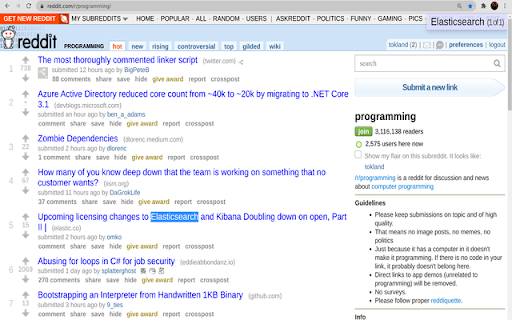
I wish it could highlight all matches rather than just one at a time. Am I missing the option?
does NOT recognize SPACES :( pls fix
Sadly it still does not match the functionality of Firefox. If I am typing and I highlight a link, I want to be able to press enter to use the link instead of clicking on it. Taking my hand off the keyboard and moving the mouse to the link and clicking on it is cumbersome.
It's okay, but there are bugs. Typing programs like type-fu, lightning type, etc - were completely incapacitated by this extension because it would search instead of let you type. I was going crazy until I figured out it was this that did it.
Can not use it to search in the Google search engine. :((
Permissions (1)
Permissions
Details
| Version | 0.4.7 |
| Updated | Mar 28, 2025 |
| Size | 18.32KiB |
| First Seen | Mar 22, 2026 |
Popular in workflow





Popular Extensions


