
⚠️Not updated in over 2 years ⚠️Below average rating
Description
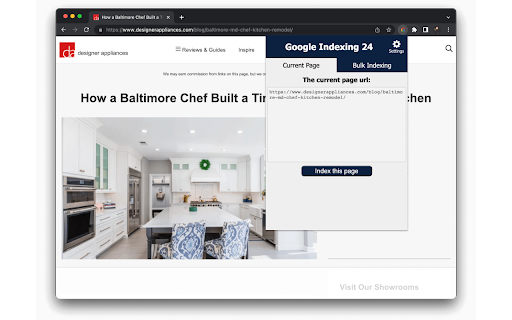
SEO indexing tool for Google will index all your URLs in 24 hours like a 🚀.
Pages on your website are not indexed? Try this Google indexing tool, using Google indexing api technique, to improve your SERP coverage and performance.
✓ 95% of Your URLs Will Be Indexed in 24 Hours
✓ UNLIMITED URLs Indexing
✓ Super Simple & Crazy FAST
✓ Click the Button and Voila, Your Pages Are Indexed
🧐What’s different from Rank Math Google Indexing api plugin?
All of them use the Google Indexing api technique. This Chrome extension makes it much easier to send the index request.
Just one click.
It's perfect for the site which isn't based on WordPress or the site owner doesn't want to install Rankmath, maybe the Yoast fans.
📚How to use google indexing api?
To be honest, the whole setting process isn’t easy. So I’ve created this step-by-step guide to help you get it done:
https://www.appthatsells.com/google-indexing-api-tool-guide/
🚄What is Google indexing api quota?
According to the Google Search Console, the default daily Google indexing api quota is 200, which means you can index 200 URLs per day using this extension.
✈️What is a URL?
This is the address of a web page that appears in the browser’s address bar.
The URL you want to index or update on SEO Indexing Tool can be :
- a page or an article from one of your sites;
- a product page or blog page from your e-commerce sites
🧐Why you have to index your page on Google?
In short, if you don’t index your page on Google, you won’t get any organic traffic from Google.
Indexing your URLs is the start of boosting your traffic on Google.
🚀How do I know if a URL has been indexed or not?
* Copy the url that you want to check. Then go to Google and search:
site:https://example.com
or
inurl: https://example.com
* Log in your Google Search Console, then inspect the url you want to check from the top bar of GSC.




Reviews (6 cached)
★☆☆☆☆2026-03-12
euweed4all dispensary
trying to buy but its not working, its saying Page not found
★☆☆☆☆2025-04-23
Надежный Советник
not working!
★☆☆☆☆2025-03-06
Faith Oludimu
This tool is a scam please dont buy it
★☆☆☆☆2024-12-03
Rizwan
not working, waste of time
★☆☆☆☆2024-10-14
Vuyof Gillo
I suggest you give some free trial. Nobody wants to risk $50 for something he/she is not sure of. so its a no for me.
★☆☆☆☆2023-10-20
Vlad B.
It is not possible to evaluate the application, they ask for payment for the extension right away. I don't want to risk 50$ for software that may not work.
Permissions (2)
Permissions
storageℹ Can store data locally in your browser tabsℹ Can see your open tabs and their URLs
Details
| Version | 1.3 |
| Updated | Sep 13, 2022 |
| Size | 13.98KiB |
| First Seen | Mar 23, 2026 |
Popular in workflow

Adobe Acrobat: PDF edit, convert, sign tools
by Adobe Inc.
330M
★ 4.40
workflow
330M
★ 4.40
workflow

Chrome Remote Desktop
by Chrome Remote Desktop Release Managers
38M
★ 3.14
workflow
38M
★ 3.14
workflow

Microsoft Power Automate
by Microsoft Corporation
10M
★ 1.99
workflow
10M
★ 1.99
workflow

Screencastify - Screen Video Recorder
by castify-ext-dev
9M
★ 3.95
workflow
9M
★ 3.95
workflow

Mendeley Web Importer
by Mendeley
3M
★ 2.25
workflow
3M
★ 2.25
workflow
Popular Extensions
Adobe Acrobat: PDF edit, convert, sign tools
by Adobe Inc.
330M
★ 4.40
workflow
330M
★ 4.40
workflow
Chrome Remote Desktop
by Chrome Remote Desktop Release Managers
38M
★ 3.14
workflow
38M
★ 3.14
workflow

Cisco Webex Extension
by cisco.chromestore
24M
★ 2.34
social
24M
★ 2.34
social

Kami for Google Chrome™
by Kami
17M
★ 4.56
education
17M
★ 4.56
education

Read&Write for Google Chrome™
by Texthelp
17M
★ 3.44
accessibility
17M
★ 3.44
accessibility