inboxy: Inbox Bundles for Gmail icon

inboxy: Inbox Bundles for Gmail

by inboxy

v1.6.5 Updated Feb 28, 2023 221KiB
CWS
1K
Users
★ 4.67
40 reviews
#3773
of 49.5K
workflow
#976 of 6.2K
⚠️Not updated in over 2 years

Description

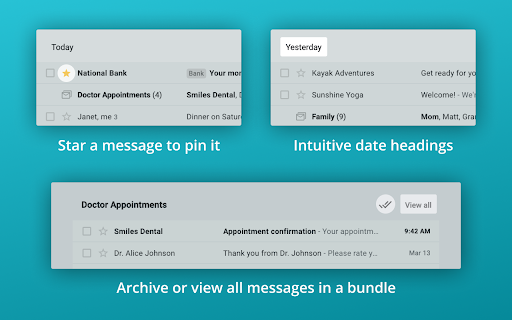
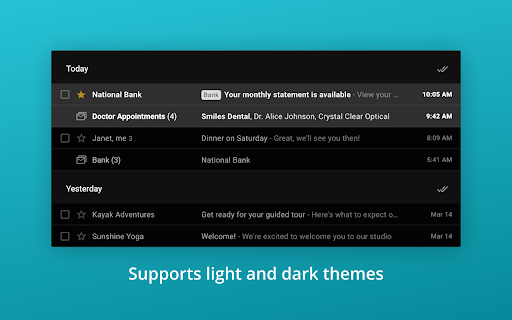
inboxy makes it easier to manage your inbox, by bringing Google Inbox bundles to Gmail. inboxy bundles together emails that share the same labels. To get started with bundling, simply create filters to apply labels to incoming emails. HIGHLIGHTS - Messages with the same label are bundled together in your inbox - Archive all bundled messages on the current page quickly - Use email filters to bundle messages automatically - Star a message to pin it outside of its bundle - Intuitive date headings - Supports light and dark themes PRIVACY & SECURITY inboxy is a lightweight visual layer over Gmail, and it uses Javascript and CSS to draw bundles. With the default settings, inboxy does not handle any personal/sensitive data. In addition, inboxy is open-source, and all code is available on Github. However, if you choose to customize your extension settings, inboxy uses the Chrome Storage Sync API to sync settings to browsers that you're logged into. For further details, see the privacy policy at https://www.inboxymail.com#privacy-policy. HAVE FEEDBACK? Post issues to the Github repo at https://github.com/teresa-ou/inboxy/issues. Visit https://www.inboxymail.com for more info.
inboxy: Inbox Bundles for Gmail screenshot 1inboxy: Inbox Bundles for Gmail screenshot 2inboxy: Inbox Bundles for Gmail screenshot 3inboxy: Inbox Bundles for Gmail screenshot 4inboxy: Inbox Bundles for Gmail screenshot 5

Reviews (3 cached)

★★☆☆☆2025-07-11
Jeff Axelrod

Unfortunately this abandaonware extension is very broken as of July 2025. Requires constantly refreshing the gmail window to maintain functionality. It was great during the brief period that it functioned properly and was maintained. I've switched to Simplify Gmail, which is paid, but works, is maintained and has a bunch of additional features.

★★★☆☆2021-03-11
Ace M

It looks great but they dont give you all the options, i dont want the archiving option as i have clicked it accidentally a few times, but nope you are forced to use it, so instead i just remove the extension

★★★☆☆2020-11-12
John B Casey

This extension does a great job except that with the volume of email I get the fact that it can only handle the last 100 messages in the gmail inbox is just not going to cut it. Most days that is not even all my email for the day.

Permissions (2)

Permissions

declarativeContent Can show the extension icon based on page content storage Can store data locally in your browser

Details

Version 1.6.5
Updated Feb 28, 2023
Size 221KiB
First Seen Mar 22, 2026


