
Symbol Typer - Write Math and Symbols Easily
v0.71 Updated Oct 3, 2023 18.19KiB
⚠️Not updated in over 2 years ⚠️Very few reviews for its user base
Description
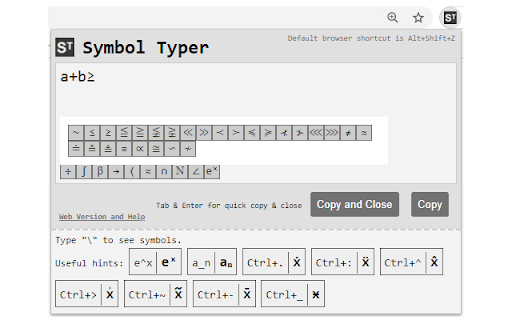
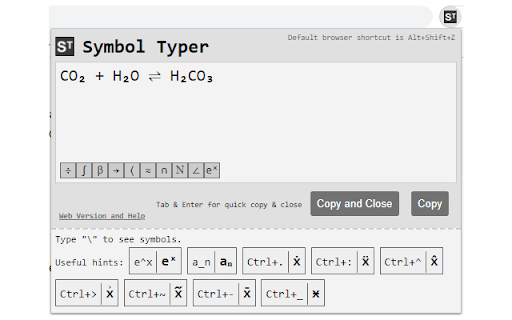
Using Symbol Typer, you can easily type mathematical symbols in plain text.
Simply open the extension and start typing: e^x will turn into eˣ,\alpha will become α, and many other symbols are available.
- Math? Easy! A\cup B = C → A∪B=C
- Chemistry? No problem! H_2 O → H₂O
- Physics? We got your back! H(t)|\Psi(t)\ket → H(t)|Ψ(t)〉
To activate the extension press Alt+Shift+Z in your browser or set a shortcut of your own in Chrome->Settings->Extensions->Menu->Keyboard Shortcuts.
No permissions are required for Symbol Typer to work! This extension is lightweight, quick and easy.
New in version 0.71:
-- New symbol buttons
New in version 0.70:
-- New symbols including \llbracket, \rrbracket (⟦,⟧)

Reviews
Loading reviews...
Details
| Version | 0.71 |
| Updated | Oct 3, 2023 |
| Size | 18.19KiB |
| First Seen | Mar 21, 2026 |
Popular in tools

Microsoft Bing Homepage & Search for Chrome
by Microsoft Corporation
4M
★ 3.72
tools
4M
★ 3.72
tools

Monica: All-In-One AI Assist & Smartest AI Agent
by Monica Team
3M
★ 4.89
tools
3M
★ 4.89
tools

Ad Blocker: Stands AdBlocker
by Stands
3M
★ 4.79
tools
3M
★ 4.79
tools

Google Dictionary (by Google)
by dictionary-extension-dev
3M
★ 4.36
tools
3M
★ 4.36
tools

WPS浏览器助手:文档在线阅读编辑
by 金山PDF
2M
★ 2.90
tools
2M
★ 2.90
tools
Popular Extensions

Adobe Acrobat: PDF edit, convert, sign tools
by Adobe Inc.
330M
★ 4.40
workflow
330M
★ 4.40
workflow

Chrome Remote Desktop
by Chrome Remote Desktop Release Managers
38M
★ 3.14
workflow
38M
★ 3.14
workflow

Cisco Webex Extension
by cisco.chromestore
24M
★ 2.34
social
24M
★ 2.34
social

Kami for Google Chrome™
by Kami
17M
★ 4.56
education
17M
★ 4.56
education

Read&Write for Google Chrome™
by Texthelp
17M
★ 3.44
accessibility
17M
★ 3.44
accessibility