
⚠️Not updated in over 2 years
Description
Now you can easily identify any font on the page using Font Finder.
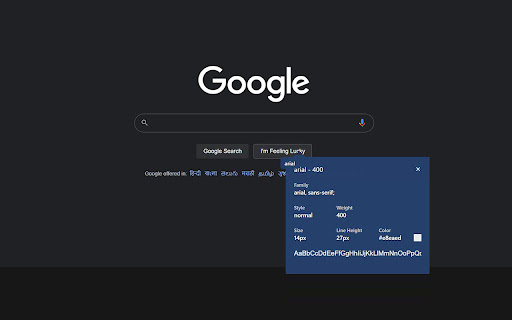
Whatfont extension is a perfect for developer, graphic designers and for everyone who wants to identify the font details.
This font finder extension for chrome browser gives you information about font name, family, weight, color and more.
✅ What this extension detects:
1. Font Family
2. Font Size
3. Font Weight
4. Line Height
5. Font Style
6. RGB Color Code
✅ How To Use :
1. Click on the “Add to chrome” button to install it
2. Tap on “Whatfont Plus” icon, this will enable the extension
3. Click the mouse pointer on any word for which you want to get font details
4. After clicking the word you will get all the font details
Version 2.1.1 changes:
- New UI design
- Improved usability


Reviews
Loading reviews...
Permissions (5)
Permissions
activeTabℹ Can access the current tab when you click the extension gcm notificationsℹ Can show desktop notifications storageℹ Can store data locally in your browser unlimitedStorage
Details
| Version | 2.1.11 |
| Updated | Sep 2, 2023 |
| Size | 35.68KiB |
| First Seen | Mar 21, 2026 |
Popular in workflow

Adobe Acrobat: PDF edit, convert, sign tools
by Adobe Inc.
330M
★ 4.40
workflow
330M
★ 4.40
workflow

Chrome Remote Desktop
by Chrome Remote Desktop Release Managers
38M
★ 3.14
workflow
38M
★ 3.14
workflow

Microsoft Power Automate
by Microsoft Corporation
10M
★ 1.99
workflow
10M
★ 1.99
workflow

Screencastify - Screen Video Recorder
by castify-ext-dev
9M
★ 3.95
workflow
9M
★ 3.95
workflow

Mendeley Web Importer
by Mendeley
3M
★ 2.25
workflow
3M
★ 2.25
workflow
Popular Extensions
Adobe Acrobat: PDF edit, convert, sign tools
by Adobe Inc.
330M
★ 4.40
workflow
330M
★ 4.40
workflow
Chrome Remote Desktop
by Chrome Remote Desktop Release Managers
38M
★ 3.14
workflow
38M
★ 3.14
workflow

Cisco Webex Extension
by cisco.chromestore
24M
★ 2.34
social
24M
★ 2.34
social

Kami for Google Chrome™
by Kami
17M
★ 4.56
education
17M
★ 4.56
education

Read&Write for Google Chrome™
by Texthelp
17M
★ 3.44
accessibility
17M
★ 3.44
accessibility