
Description
🔒 Browser Lock – Password Protect & Secure Your Browser
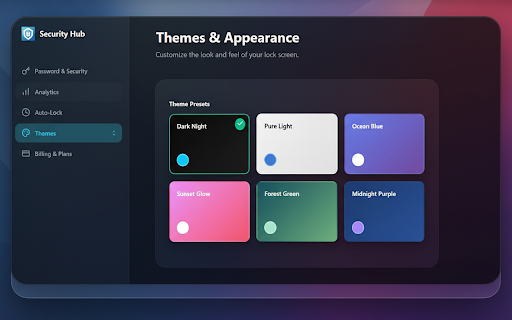
Keep your browser private and protected with Browser Lock, the easiest way to lock your browser with a password or PIN. Stop anyone from seeing your history, tabs, or settings on shared computers. Whether you’re at home, work, or school, Browser Lock keeps your personal data safe.
⚙️ Key Features
Password & PIN Protection: Lock your entire browser or specific tabs in one click.
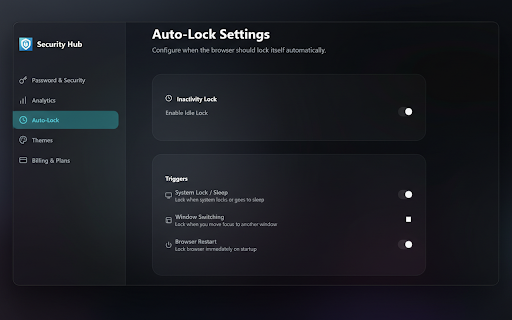
Auto-Lock & Timeout: Browser locks automatically after inactivity — perfect for shared devices.
Kiosk Mode: Enable secure single-session browsing on public or workplace computers.
Tab Lock: Protect only the tabs you choose (like banking or email).
Privacy First: No browsing data collected — your information stays on your device.
💡 Why Choose Browser Lock
If you’ve ever wondered, “Can I bypass LockDown Browser?” — the answer is no, and you shouldn’t. Browser Lock isn’t made for cheating or bypassing secure exam browsers; it’s built for personal privacy and security.
This locked browser ensures that no one can open your tabs or see your history without your permission. Think of it as your own browser with lock, giving you total control over access.
❓ FAQ
Q: What is Browser Lock?
A: Browser Lock is a security extension that lets you protect your browser with a password or PIN. Once enabled, no one can open or use your browser without entering the correct code.
Q: Can I bypass LockDown Browser with this extension?
A: No — Browser Lock is designed for privacy and everyday use, not for bypassing security software like LockDown Browser.
Q: Is this a locked browser or a lock for any browser?
A: It’s a lock that works with your existing browser. Once activated, it behaves like a locked browser until you unlock it.
Q: Does Browser Lock slow down my browser?
A: Not at all — it runs lightly in the background and activates only when needed.

Reviews
Loading reviews...
Permissions (5)
Permissions
alarmsℹ Can schedule periodic background tasks idleℹ Can detect when you're away from the computer storageℹ Can store data locally in your browser tabsℹ Can see your open tabs and their URLs webNavigationℹ Can monitor navigation events
Details
| Version | 1.3.1 |
| Updated | Feb 19, 2026 |
| Size | 199KiB |
| First Seen | Mar 29, 2026 |
More by Innvexia

PDF Clear - Watermark Remover
by Innvexia
49
★ 0.00
tools
49
★ 0.00
tools

Smart Autofill
by Innvexia
45
★ 0.00
tools
45
★ 0.00
tools

QuickShot Screenshot Editor
by Innvexia
37
★ 5.00
tools
37
★ 5.00
tools

QuickBlock - Simple Ad Blocker
by Innvexia
21
★ 0.00
tools
21
★ 0.00
tools

PDF to PowerPoint Converter
by Innvexia
17
★ 0.00
tools
17
★ 0.00
tools
Popular in privacy

AdGuard AdBlocker
by Adguard Software Ltd
17M
★ 4.66
privacy
17M
★ 4.66
privacy

uBlock Origin Lite
by Raymond Hill (gorhill)
16M
★ 4.49
privacy
16M
★ 4.49
privacy

uBlock Origin
by Raymond Hill (gorhill)
15M
★ 4.70
privacy
15M
★ 4.70
privacy

Online Security
by ReasonLabs
12M
★ 3.62
privacy
12M
★ 3.62
privacy

VPN for Chrome: NordVPN proxy protection
by NordVPN
12M
★ 4.24
privacy
12M
★ 4.24
privacy
Popular Extensions

Adobe Acrobat: PDF edit, convert, sign tools
by Adobe Inc.
331M
★ 4.40
workflow
331M
★ 4.40
workflow

Grammarly: AI Writing Assistant and Grammar Checker App
by Grammarly
42M
★ 4.50
communication
42M
★ 4.50
communication

Chrome Remote Desktop
by Chrome Remote Desktop Release Managers
38M
★ 3.14
workflow
38M
★ 3.14
workflow

Microsoft Single Sign On
by Microsoft
36M
★ 2.27
workflow
36M
★ 2.27
workflow

Cisco Webex Extension
by cisco.chromestore
23M
★ 2.34
social
23M
★ 2.34
social