
Description
Page Screenshot is an addon that enables you to capture a full-page screenshot from any desired website.
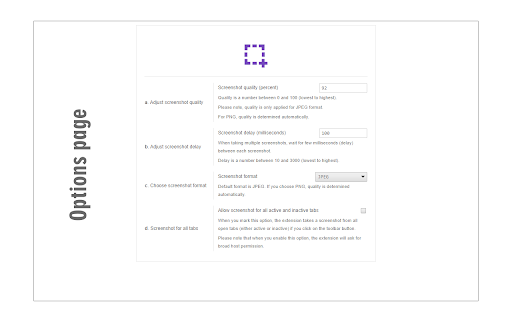
Please click on the toolbar button (or press Alt+Shift+D combination) to capture the screenshot. You can adjust the screenshot image format from the options page. Moreover, image quality and the time delay between multiple screenshots are also customizable. The screenshot will be saved to the default download location in your browser. Please note, to change the download location, visit the settings page in your browser.
Note 1: you need to "reload" all opened tabs before using the addon.
Note 2: for long-page websites, Page Screenshot automatically scrolls the page from top to bottom (vertical scroll) to capture the screenshot. But, it does not have a horizontal scroll in case the page is too wide.
To report bugs, please fill out the bug report form on the addon's homepage (https://mybrowseraddon.com/page-screenshot.html).

Reviews
Loading reviews...
Permissions (3)
Permissions
activeTabℹ Can access the current tab when you click the extension scriptingℹ Can inject scripts into web pages storageℹ Can store data locally in your browser
Details
| Version | 0.1.8 |
| Updated | Dec 16, 2025 |
| Size | 26.52KiB |
| First Seen | Mar 26, 2026 |
More by MeryDev

Volume Booster for YouTube™
by MeryDev
70K
★ 4.68
well_being
70K
★ 4.68
well_being

WebRTC Protect - Protect IP Leak
by MeryDev
60K
★ 4.12
workflow
60K
★ 4.12
workflow

YouTube Dark Theme
by MeryDev
60K
★ 4.23
accessibility
60K
★ 4.23
accessibility

Dark Theme for Google™
by MeryDev
50K
★ 4.02
developer
50K
★ 4.02
developer

Mute Tab
by MeryDev
10K
★ 3.51
tools
10K
★ 3.51
tools
Popular in tools

Browsec VPN - Free VPN for Chrome
by Browsec
7M
★ 4.44
tools
7M
★ 4.44
tools

AnyDoc Translator - Translate Web and PDF
by www.wps.com
7M
★ 4.59
tools
7M
★ 4.59
tools

Microsoft Bing Homepage & Search for Chrome
by Microsoft Corporation
4M
★ 3.72
tools
4M
★ 3.72
tools

IE Tab
by Blackfish Software
4M
★ 4.31
tools
4M
★ 4.31
tools

Monica: All-In-One AI Assist & Smartest AI Agent
by Monica Team
3M
★ 4.89
tools
3M
★ 4.89
tools
Popular Extensions

Adobe Acrobat: PDF edit, convert, sign tools
by Adobe Inc.
331M
★ 4.40
workflow
331M
★ 4.40
workflow

Chrome Remote Desktop
by Chrome Remote Desktop Release Managers
38M
★ 3.14
workflow
38M
★ 3.14
workflow

Microsoft Single Sign On
by Microsoft
36M
★ 2.27
workflow
36M
★ 2.27
workflow

Cisco Webex Extension
by cisco.chromestore
23M
★ 2.34
social
23M
★ 2.34
social

Kami for Google Chrome™
by Kami
19M
★ 4.56
education
19M
★ 4.56
education