
WinkWink - Ace Your Studies & Questions, Using Quizlet
by glvckoma
v2.2 Updated Jan 22, 2025 2.35MiB
⚠️Not updated in over a year
Description
🎓 **WinkWink Search 2.0** - Your Comprehensive Answer Finder via Quizlet & More 🌟
📚 **Description:**
WinkWink Search 2.0 is a powerful Chrome extension that transforms your study sessions by providing instant access to Quizlet flashcards and study set all in a sleek, user-friendly interface built with React and Mantine. Whether you're researching for exams/homeowrk or satisfying a sudden burst of curiosity, WinkWink 2.0 has you covered!
🚀 **Key Features:**
🌐 **Intuitive Search Options:**
• ➡️ **Manual Input:** Type your question directly into the search box and hit **Search** for immediate results.
• 👉 **Right-Click Context:** Simply highlight text anywhere on a webpage, right-click, and select **Search with Wink** for on-the-spot answers.
🎨 **Customizable Results Display:**
• 🎚️ **Adjustable Matches:** Use the slider in settings to decide how many matching answers or study sets get displayed.
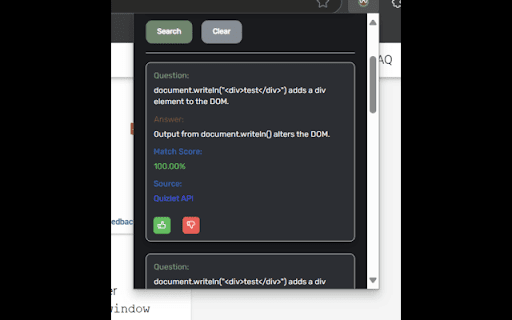
• 💡 **Detailed Result Cards:** Each card shows the question, answer, match score, and source with interactive hover details for extra insights.
👍 **User Feedback & Real-Time Updates:**
• ✨ (Beta) **Instant Feedback:** Like or dislike results with a tap, helping to refine future searches.
• 🔔 **Live Notifications:** Receive real-time alerts when searches complete or if errors occur for a smooth experience.
👁️🗨️ **Enhanced Viewing Modes:**
• 🌙 **Dark Mode:** Toggle a comfortable dark theme for those late-night study sessions.
• 👻 **Hidden Mode:** Activate to minimize clutter and focus solely on the content behind the Floating UI.
• 🖥️ **Floating UI Mode:** Enable a floating search icon that stays accessible on any webpage.
⚙️ **Easy Settings & Support:**
• 🔧 **Customizable Settings:** Quickly adjust display options, search parameters, and interface modes in the settings drawer.
• ❓ **In-App Help:** Access a detailed help modal with step-by-step instructions to make the most of all features.
• 💖 **Donate & Support:** Enjoying WinkWink? Consider donating to support ongoing development!
🔒 **Legal Notice:**
WinkWink Search 2.0 is designed solely as a study tool to enhance your learning experience. It accesses publicly available data from Quizlet and other sources. **Important:** This tool must be used in accordance with academic integrity guidelines and is not intended to facilitate cheating on any exams, tests, or assignments.
✨ **Elevate your study game** with WinkWink Search 2.0 experience a smarter, faster, and more personalized way to find the answers you need, all without switching tabs!



Reviews
Loading reviews...
Permissions (6)
Permissions
activeTabℹ Can access the current tab when you click the extension commands contextMenusℹ Can add items to the right-click menu scriptingℹ Can inject scripts into web pages storageℹ Can store data locally in your browser tabsℹ Can see your open tabs and their URLs
Details
| Version | 2.2 |
| Updated | Jan 22, 2025 |
| Size | 2.35MiB |
| First Seen | Mar 22, 2026 |
Popular in education

Kami for Google Chrome™
by Kami
17M
★ 4.56
education
17M
★ 4.56
education

Language Reactor
by Dioco
2M
★ 4.20
education
2M
★ 4.20
education

xFanatical Safe Doc
by xFanatical
700K
★ 1.46
education
700K
★ 1.46
education

GPTZero: AI Detection & Writing Replay
by chrome-extension-publisher
400K
★ 4.57
education
400K
★ 4.57
education

You Shall Not Pass by Jim Tyler
by JamesTyler
400K
★ 1.44
education
400K
★ 1.44
education
Popular Extensions

Adobe Acrobat: PDF edit, convert, sign tools
by Adobe Inc.
330M
★ 4.40
workflow
330M
★ 4.40
workflow

Chrome Remote Desktop
by Chrome Remote Desktop Release Managers
38M
★ 3.14
workflow
38M
★ 3.14
workflow

Cisco Webex Extension
by cisco.chromestore
24M
★ 2.34
social
24M
★ 2.34
social
Kami for Google Chrome™
by Kami
17M
★ 4.56
education
17M
★ 4.56
education

Read&Write for Google Chrome™
by Texthelp
17M
★ 3.44
accessibility
17M
★ 3.44
accessibility