
⚠️Requests 1 sensitive permission
Description
# ProxyDeck - Advanced Proxy Management for Power Users
Take complete control of your network connections with ProxyDeck, the most flexible proxy management extension for Chrome. Whether you're a developer accessing internal servers, a security professional testing network configurations, or a power user who needs granular control over web traffic, ProxyDeck provides the advanced routing capabilities you need with an intuitive interface.
## Key Features That Set Us Apart
### **Smart Pattern-Based Routing**
Create powerful routing rules using regex patterns to automatically direct specific websites through designated proxies. Perfect for:
- Routing development servers through corporate proxies
- Accessing geo-restricted content through specific proxies
- Isolating sensitive traffic through secure connections
### **Real-Time Traffic Monitoring**
Track bandwidth usage with unprecedented detail:
- Monitor total upload/download traffic across all connections
- View per-proxy bandwidth consumption
- Make informed decisions about proxy usage and performance
### **Multiple Proxy Management**
Configure and manage unlimited proxy servers:
- Support for SOCKS4, SOCKS5, and HTTP proxies
- Secure authentication with encrypted credential storage
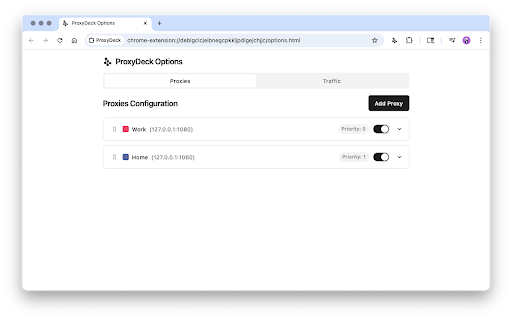
- Visual priority system with color-coded proxy indicators
- Drag-and-drop priority reordering
- Enable/disable individual proxies without losing configurations
### **Intelligent Priority System**
When multiple proxies match a URL pattern, ProxyDeck automatically selects the highest priority proxy. Easily adjust priorities to fine-tune your routing preferences and ensure critical connections always use the right proxy.
### **Professional User Interface**
- Clean, modern design that adapts to light and dark themes
- Popup interface for quick proxy toggling
- Comprehensive options page for detailed configuration
- Visual feedback showing which proxy is handling current tab traffic
- Icon badges indicates active proxy on current tab
## Who Benefits from ProxyDeck?
### Software Developers
- Route development environments through corporate proxies
- Test applications with different network configurations
- Access internal resources while maintaining normal browsing
### IT Professionals
- Manage multiple client environments simultaneously
- Quick switching between different network contexts
- Monitor bandwidth usage for troubleshooting
### Privacy-Conscious Users
- Route sensitive traffic through trusted proxies
- Maintain different browsing contexts
- Monitor exactly where your data flows
## How It Works
1. **Configure Your Proxies**: Add your proxy servers in the options page with host, port, and optional authentication
2. **Set Up Routing Rules**: Create regex patterns to match URLs that should use specific proxies
3. **Set Priorities**: Arrange proxies by priority to control which proxy handles overlapping patterns
4. **Monitor Traffic**: Watch real-time bandwidth usage to understand your traffic flow
5. **Stay in Control**: The extension icon shows current active proxy
## Privacy & Security First
ProxyDeck is designed with your privacy in mind:
- All credentials are stored locally using Chrome's encrypted storage
- No external servers or analytics - everything runs in your browser
- Open source code for complete transparency
- Your browsing data never leaves your control
## Professional Features, Simple Experience
Despite its powerful capabilities, ProxyDeck maintains an intuitive interface. The popup provides quick access to enable/disable proxies and view current status, while the options page offers comprehensive configuration without overwhelming complexity.
## Installation & Getting Started
1. Click "Add to Chrome" to install ProxyDeck
2. Click the extension icon and select "Options" to configure your first proxy
3. Add proxy details and create routing patterns
4. Start browsing with complete control over your connections
Transform how you manage proxy connections. Install ProxyDeck today and experience the difference that thoughtful design and powerful features can make.


Reviews
Loading reviews...
Permissions (5)
Permissions
alarmsℹ Can schedule periodic background tasks proxyℹ Can configure proxy settings storageℹ Can store data locally in your browser tabsℹ Can see your open tabs and their URLs webRequestℹ Can observe and analyze network traffic
Details
| Version | 1.6.0 |
| Updated | Jan 20, 2026 |
| Size | 402KiB |
| First Seen | Mar 24, 2026 |
Popular in developer

Lighthouse
by lighthouse-extension-owners
1M
★ 4.42
developer
1M
★ 4.42
developer

Контур.Плагин
by kontur.extension
1M
★ 3.11
developer
1M
★ 3.11
developer

Similarweb - Website Traffic & SEO Checker
by Similarweb
1M
★ 4.66
developer
1M
★ 4.66
developer

Clear Cache
by Little Void LLC (Ben Bojko)
1M
★ 4.45
developer
1M
★ 4.45
developer

SEO META in 1 CLICK
by Bilal Hadri
900K
★ 4.87
developer
900K
★ 4.87
developer
Popular Extensions

Adobe Acrobat: PDF edit, convert, sign tools
by Adobe Inc.
330M
★ 4.40
workflow
330M
★ 4.40
workflow

Chrome Remote Desktop
by Chrome Remote Desktop Release Managers
38M
★ 3.14
workflow
38M
★ 3.14
workflow

Cisco Webex Extension
by cisco.chromestore
24M
★ 2.34
social
24M
★ 2.34
social

Kami for Google Chrome™
by Kami
17M
★ 4.56
education
17M
★ 4.56
education

Read&Write for Google Chrome™
by Texthelp
17M
★ 3.44
accessibility
17M
★ 3.44
accessibility