Everything for a Username!
- That's right. No email addresses. No mobile phones. No remembering those pesky passwords. Just you and a username you get to choose!
- Don't worry though, we believe your private information should stay private hence there's strong authentication going on behind the scenes.
Share Accounts - Not Passwords.
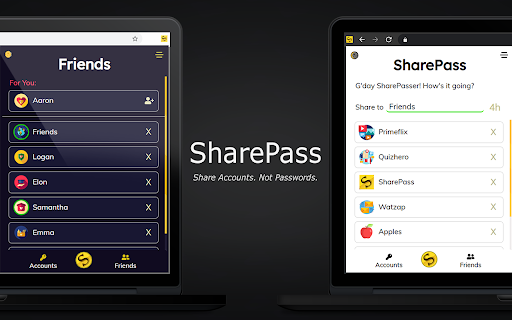
- Share temporary access for 4 hours, 1 day, 7 days or 2 weeks! Perfect for a socially-distanced movie night or binge watching the latest season of your favourite TV show.
- Your accounts are encrypted and sent via an SSL secured network - no need to generate manual URLs which store your sessions on a server, just type in their username and hit SharePass!
- Sessions are stored locally on your device, meaning even we can't access your data.
Share with Friends!
- We'll automatically add to your Friends list when you SharePass or Receive so you don't have to.
- If you want to SharePass to the same user again, just click on their name in your Friends list when they're online! No need to remember or type their usernames.
Anytime Sharing!
- Turn on Anytime Sharing in the Settings to share to Friends even when they are not online!
Presence
- A green circle will appear around a Friend's icon suggesting they are online
- If a user is not your friend yet, the SharePass yellow underline will turn green as well.
Works on a wide range of websites
- We combine your cookies and storage data to create a shareable session but please do not share sensitive accounts.
Notifications
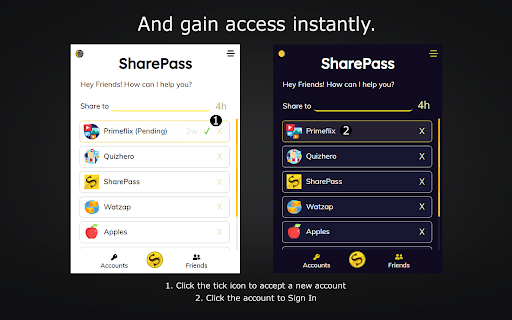
- When you receive new accounts, you will be notified within your browser so you can sign in automatically.
User Guide & More Information: https://sharepass.app
---
SPv2.9
- Christmas 2024 Special Update: Featuring a discounted premium subscription
SPv2.8
- Fix for SharePass+ Subscription Checks
- Minor Performance Improvements
SPv2.7
- Fix for Sharing Durations of 2 Weeks and 1 Year
SPv2.6
- Introducing SharePass Premium! Share for 1 month, 3 months, 6 months and 1 whole year!
- Anytime sharing is now enabled for everyone
- Improved UI and Bug Fixes
- Speed and stability improvements
SPv2.5
- We're back! Big updates are coming this year so stay tuned!
- Forced log out when your session timer has ended
- Loading screen to minimise session load issues
- Updated for the latest versions of Chrome
- Speed and stability improvements
SPv2.4
- Anytime Sharing allows you to share with Friends even when they are not online! Go to Settings to turn it on.
- Stability Improvements
SPv2.3
- Rich Notifications - automatically sign by clicking on a notification when you are sent an account
- Bug fixes
SPv2.1
- Extension load speed significantly improved
- The new Settings page allows users to fine-tune their privacy preferences
- Duration countdown timer now appears all the time
- Many new websites can now be SharePassed
- New languages added: French, Spanish, Dutch, Bangla, Hindi, Portuguese, Thai
SPv2
- Automatically add new Friends by sharing to them!
- See when Friends are online: a green circle will appear around a friend's icon if they are online
- No need to keep typing usernames anymore, just click on a friend in your Friends list to share to them
- Find mutual friends
- Dark Mode
- 2 week duration option added
- Support for more websites
- Redesigned UI
- Sender username added to notification
- Bug fixed around automatic Sign In
SPv1.5
- Choose to SharePass for 4 hours, 1 or 7 days! The timer starts when a receiver accepts a session and once their time runs out, the session will automatically be removed and the user will be signed out of your account - perfect for temporary access.
**Disclaimer**
By downloading this extension, you are agreeing to the following:
- You will only share accounts to people you know and trust
- You will continue to abide by the terms and conditions of the accounts you are sharing or receiving on our platform
- Although efforts are made to secure and encrypt your accounts as they are shared, the security of your accounts is ultimately your responsibility
- This extension uses Google Analytics to collect extension usage statistics to help improve user experience. If you want to opt-out of Google Analytics tracking, please visit http://tools.google.com/dlpage/gaoptout or you can set up a filter in Adblock Plus or similar ad blocker tools like AdBlock, uBlock or Adblock Pro.
- By using this extension, you agree to the SharePass Privacy Policy available at https://sharepass.app/#three
Feel free to contribute to our roadmap by suggesting features or reporting bugs to sharepassapp@gmail.com