
⚠️Not updated in over a year
Description
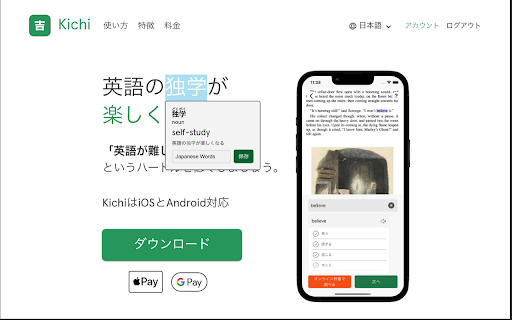
Define words and phrases that you don't know with a single click, and then add them to Kichi as flashcards to review later!
Simply highlight any text on the page, right-click, and select "Kichi."
The words are also defined in context. For example, "let" will give different explanations for "let me", "let down", and "let go".
This extension requires an active Kichi account. For more on Kichi, visit https://kichi.io
Reviews
Loading reviews...
Permissions (3)
Permissions
activeTabℹ Can access the current tab when you click the extension contextMenusℹ Can add items to the right-click menu storageℹ Can store data locally in your browser
Details
| Version | 1.0 |
| Updated | Apr 8, 2024 |
| Size | 132KiB |
| First Seen | Mar 21, 2026 |
More by rob


Popular in education

Kami for Google Chrome™
by Kami
17M
★ 4.56
education
17M
★ 4.56
education

Language Reactor
by Dioco
2M
★ 4.20
education
2M
★ 4.20
education

Speechify — Text to Speech
by Speechify
1M
★ 4.59
education
1M
★ 4.59
education

LibKey Nomad
by Third Iron LLC
1M
★ 4.71
education
1M
★ 4.71
education

xFanatical Safe Doc
by xFanatical
700K
★ 1.46
education
700K
★ 1.46
education
Popular Extensions

Adobe Acrobat: PDF edit, convert, sign tools
by Adobe Inc.
330M
★ 4.40
workflow
330M
★ 4.40
workflow

Chrome Remote Desktop
by Chrome Remote Desktop Release Managers
38M
★ 3.14
workflow
38M
★ 3.14
workflow

Cisco Webex Extension
by cisco.chromestore
24M
★ 2.34
social
24M
★ 2.34
social
Kami for Google Chrome™
by Kami
17M
★ 4.56
education
17M
★ 4.56
education

Read&Write for Google Chrome™
by Texthelp
17M
★ 3.44
accessibility
17M
★ 3.44
accessibility