
Bulk File Downloader icon

Bulk File Downloader

v2.3 Updated Oct 4, 2025 48.56KiB
CWS
10K
Users
★ 3.27
52 reviews
#985
of 42.2K
workflow
#292 of 5.2K

Description

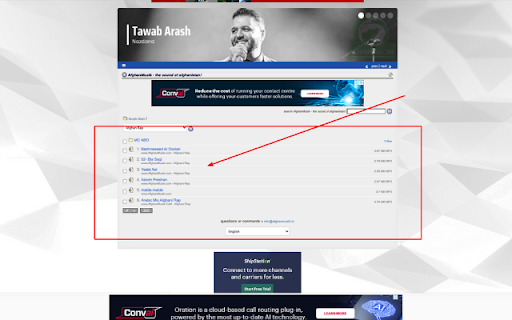
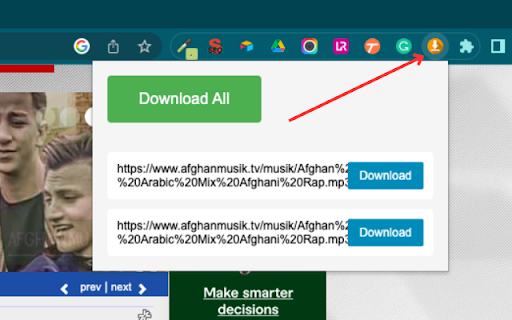
Bulk Download Files: The Ultimate File-Saving Tool Tired of manually downloading individual files from web pages? Meet "Bulk Download Files", a versatile and easy-to-use Chrome extension designed to make your life easier. With a single click, "Bulk Download Files" scans your current webpage and fetches all available downloadable files. It's not limited to a specific file type - whether you're looking for music files (.mp3), videos (.mp4, .avi), documents (.doc, .docx, .xls, .xlsx, .pdf), or images (.jpeg, .jpg, .png, .gif), our extension has got you covered. Once the scan is complete, you'll see a list of all found files right in your browser. Now, you can either pick and choose which files to download, or simply hit the "Download All" button to get everything at once. It's as simple as that! Here's why users love "Bulk Download Files": Saves time by bulk downloading files Works with a wide range of file types Clean and user-friendly interface Easily accessible via the browser toolbar So why wait? Try "Bulk Download Files" today and experience a smoother, quicker way to download files from the internet. Enjoy efficient browsing and never worry about manual downloads again! What’s New (Pro Version Updates) Instant Page Scan See every downloadable file on the page in seconds—no more waiting or frozen pop‑ups. One‑Click ZIP Download Bundle all your chosen files into a single ZIP with a single tap—perfect for large batches. Live Progress & ETA Watch a clear progress bar and countdown so you always know how much time is left. Smarter Downloading If a file hiccups, we’ll retry automatically—no more manual restarts. Smooth, Uninterrupted Browsing All the work happens behind the scenes, so your browser stays fast and responsive.
Bulk File Downloader screenshot 1Bulk File Downloader screenshot 2Bulk File Downloader screenshot 3

Reviews (18 cached)

★☆☆☆☆2026-03-18
Mike “Zero”

Worked on one page, but when used on another it finds all files, gives the total size, and when clicking the button, starts to compress them all. Everything seems fine, except it's been sitting for over 2 hours at 100% compression, not downloading anything.

★☆☆☆☆2025-11-27
Simon Laleman

Doesn't work on a very simple page with multiple PDF's. Just downloads the first.

★☆☆☆☆2025-06-29
Юрий Пономарев

Named "Bulk", but processing by one file.

★☆☆☆☆2025-06-10
Pieter Hoeben

It does not work. The only message is "No files found" on a page full with PDFs. Pointless, waiste of money.

★☆☆☆☆2025-06-06
Humberto Ramirez

Completely useless. There is simply no way to make it work; no instructions; no menus; no support; no replies to messages. I just lost $10.00

★☆☆☆☆2025-05-20
Sol Sti

Free does not allow bulk, so as a free extension named bulk downloader, it is useless

★☆☆☆☆2025-04-20
Papa Bear

Just purchased and the bulk download does not work

★☆☆☆☆2025-04-11
Claire Finn

Download All doesn't do anything - even after paying for the pro version

★☆☆☆☆2025-03-05
KUMAR YASH

Does not work, has a static button that does nothing

★☆☆☆☆2024-09-27
Darius van Helfteren

It works, but each file needs to be seperately saved.

★☆☆☆☆2024-09-01
Knight 11692

Doesn't do anything.

★☆☆☆☆2024-08-19
Matthew Dunn

* Doesn't have option to search subfolders or links on page; it will only find files that are on the webpage itself. So, not that helpful. * Yes, you have to click, "Save," for everything -- which is forgiveable. However, you can't stop the save process once it's started. So, if you change your mind and want to stop, you can't; you have to wait for all the save windows to pop up and click, "Cancel," for each. That's not forgiveable! * Doesn't remember which folder you chose for downloads to be saved in. Not recommended.

★☆☆☆☆2024-08-08
Matt Rice

Doesn't work. Complete trash

★☆☆☆☆2024-08-06
Ratral fiofanov

worthless

★☆☆☆☆2024-06-05
Jerrell Williams

Download All just tries to save the website (as a .htm file).

★☆☆☆☆2024-04-05
Matt Smith

A bit TOO simple - no options to filter, or otherwise manage what it downloads. Despite what the other blatantly bogus "review" states (posted the same day the extension was uploaded? No, that's not suspicious at all...), this is not a "researcher's dream" - that is unless your "research" involves bulk pirating, and even then who needs EVERY format possible?

★★☆☆☆2024-04-22
Adam S.

Does not have an option to set a folder and "Download All" at once. You literally have to click Save for each file when the window pops up each time.

★★★☆☆2024-07-16
Becky Raymond

You have to hit save for every single file. I thought it was going to save as a zip file or something. It might have saved me a few clicks, but it's not worth keeping.

Permissions (4)

Permissions

activeTab Can access the current tab when you click the extension downloads Can manage and monitor downloads scripting Can inject scripts into web pages storage Can store data locally in your browser

Details

Version 2.3
Updated Oct 4, 2025
Size 48.56KiB
First Seen Mar 21, 2026


