Split Long Text for Chat GPT icon

Split Long Text for Chat GPT

by Split Long Text

v1.0 Updated Mar 26, 2023 75.96KiB
CWS
6K
Users
★ 3.50
16 reviews
#4907
of 99.6K
workflow
#1445 of 15.4K
⚠️Not updated in over 2 years

Description

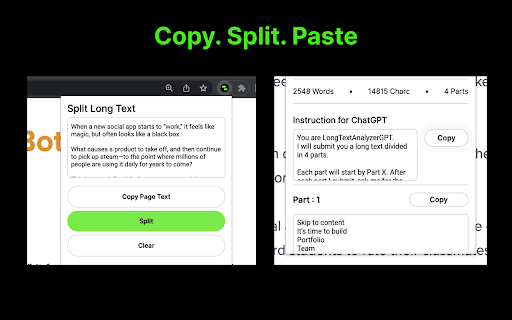
Easily split a long text, and paste each part in your chat with GPT. *** Introducing Split Long Text for Chat GPT – a must-have Chrome extension for all Chat GPT users. If you ever wanted to easily feed long text, over 4000 characters, to your chat with GPT, this extension is the perfect solution to save time and effort. No more struggling to manually divide your text; Split Long Text will do it for you in just a few simple steps. How to use Split Long Text for Chat GPT: 1. Install and open the Split Long Text Chrome extension. 2. Click on the "Copy Page" button to start the process. 3. The extension will automatically divide the long text into manageable parts. 4. Copy each part one by one, and paste it seamlessly into your chat with GPT. Experience the ease and convenience of interacting with your AI model without the character limit constraints. With Split Long Text, you can focus on what matters most – getting valuable insights from your AI-powered conversations. Key Features: • Hassle-free splitting of long text exceeding 4000 characters. • User-friendly interface for quick and easy copying and pasting. • Time-saving solution for an efficient Chat GPT experience. Please note that Split Long Text for Chat GPT is not provided or endorsed by OpenAI. It is an independent extension designed to enhance your Chat GPT user experience. Don't miss out on the opportunity to simplify your Chat GPT interactions. Install the Split Long Text for Chat GPT Chrome extension now and revolutionize the way you engage with your AI model. Click the "Add to Chrome" button and unlock a smoother, more streamlined Chat GPT experience today!
Split Long Text for Chat GPT screenshot 1Split Long Text for Chat GPT screenshot 2

Reviews (8 cached)

★☆☆☆☆2024-10-10
Presko Presko

It giving me 8 parts, i only need 2!

★★☆☆☆2024-06-17
Roberto D'Hoy

After part 6 out of 20, ChatGPT refuses to continue... why is that?

★★☆☆☆2023-10-30
Joe Park

Korean is counted not as much as English letters. Please make input letter number option.

★★☆☆☆2023-05-11
S

Korean is divided into 4,000 letters There is an error in entering the gpt due to the large number of characters. Make this 3,500 letters or allow custom input. Then it would be the best program.

★★☆☆☆2023-05-03
Matthew Halbert

Doesn't really work. Won't go past 5 parts for me.

★★☆☆☆2023-04-19
Parth Sindhu

Wrong extension, it should count tokens and limit them to 4000 , not characters. Example tokenizing website: https://platform.openai.com/tokenizer

★★★☆☆2023-06-05
Vladimir plakitin

We need to add the ability not to break words, lines, paragraphs. and then there will be no price for this extension

★★★☆☆2023-04-26
Meshach Weber

Bugggy, missed the "Part : X" intro text a few times and CHatGPT4 won't wait past 4 parts no matter how many times I try.

Permissions (2)

Permissions

activeTab Can access the current tab when you click the extension scripting Can inject scripts into web pages

Details

Version 1.0
Updated Mar 26, 2023
Size 75.96KiB
First Seen Mar 26, 2026