
Description
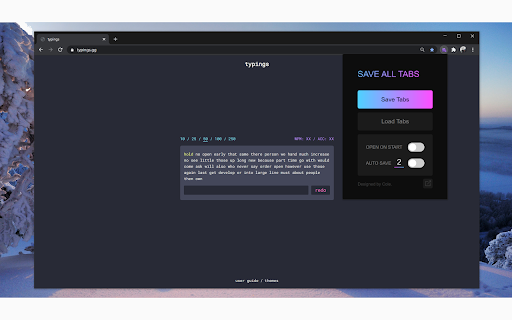
Save All Tabs makes it easy to save and restore your entire Chrome session across all open windows. Whether you're doing research, managing multiple projects, or just want a break without losing your place, this extension helps you pick up right where you left off.
Key Benefits:
- Saves tabs across multiple Chrome windows
- Maintains the exact tab order
- Recognizes regular and incognito windows
- Lets you export tabs to Chrome bookmarks
Features:
⚫ Save Tabs: Instantly save all open tabs from all active Chrome windows.
⚫ Load Tabs: Reopen your saved tabs in their original window layout and order.
⚫ Auto Open on Start: Choose whether your saved tabs automatically reopen when Chrome launches.
⚫ Auto Save Tabs: Automatically save tabs at set intervals. You can customize the frequency to fit your workflow or system performance.
⚫ Export Tabs to Bookmarks: Save all open tabs into a dedicated Chrome Bookmarks folder. The folder is named “SAVE ALL TABS” and placed at the top level for easy access.
Perfect for anyone who works with a lot of tabs and wants a simple way to manage and restore them efficiently.
Reviews
Loading reviews...
Permissions (6)
Permissions
activeTabℹ Can access the current tab when you click the extension alarmsℹ Can schedule periodic background tasks bookmarksℹ Can read and modify your bookmarks storageℹ Can store data locally in your browser tabsℹ Can see your open tabs and their URLs unlimitedStorage
Details
| Version | 1.2.1 |
| Updated | Aug 10, 2025 |
| Size | 3.49MiB |
| First Seen | Mar 27, 2026 |
Popular in workflow

Adobe Acrobat: PDF edit, convert, sign tools
by Adobe Inc.
331M
★ 4.40
workflow
331M
★ 4.40
workflow

Chrome Remote Desktop
by Chrome Remote Desktop Release Managers
38M
★ 3.14
workflow
38M
★ 3.14
workflow

Microsoft Single Sign On
by Microsoft
36M
★ 2.27
workflow
36M
★ 2.27
workflow

MetaMask
by metamask
13M
★ 2.68
workflow
13M
★ 2.68
workflow

Microsoft Power Automate
by Microsoft Corporation
10M
★ 1.99
workflow
10M
★ 1.99
workflow
Popular Extensions
Adobe Acrobat: PDF edit, convert, sign tools
by Adobe Inc.
331M
★ 4.40
workflow
331M
★ 4.40
workflow

Grammarly: AI Writing Assistant and Grammar Checker App
by Grammarly
42M
★ 4.50
communication
42M
★ 4.50
communication
Chrome Remote Desktop
by Chrome Remote Desktop Release Managers
38M
★ 3.14
workflow
38M
★ 3.14
workflow
Microsoft Single Sign On
by Microsoft
36M
★ 2.27
workflow
36M
★ 2.27
workflow

Cisco Webex Extension
by cisco.chromestore
23M
★ 2.34
social
23M
★ 2.34
social