
editGPT icon

editGPT

by SMB

v1.0.31 Updated Nov 7, 2025 54.36KiB
CWS
40K
Users
★ 4.16
49 reviews
#1331
of 88.5K
workflow
#440 of 13.6K

Description

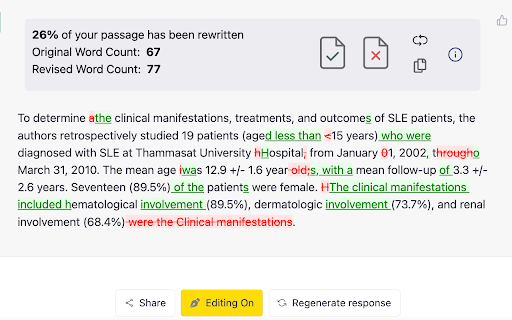
Easily proofread, edit, and track changes to your content in ChatGPT with editGPT's web app and chrome extension. IMPORTANT: For the most powerful AI proofreader experience, use the full web app at www.editgpt.app If you want to edit with editGPT in ChatGPT, download the chrome extension. editGPT Chrome Extension Instructions 1. Install the extension 2. Go to the chatGPT website. The editGPT extension only works on https://chat.openai.com/. Note: For the most powerful AI proofreader experience, go to www.editgpt.app 3. Type in a prompt that includes the text you want to edit, for example: "Proofread this: [insert your text here]." 3. Wait for the response! The 'editGPT' button only appears after the response is complete. 5. Click on the button to turn on editing mode. With the chrome extension, the 'editGPT' button will appear in the top corner of ChatGPT after a message is sent. Track Changes Select (highlight) the text and press Accept or Reject button to accept or reject changes in the highlighted portion. Reset button will reset to original. Markup button will show/hide markup. Clipboard button will copy your text including any changes you've made to clipboard (without markup). Example Prompts These four prompts typically increase how intrusive chatGPT's editing is. 1. Proofread this but only fix grammar: 2. Proofread this: 3. Proofread this, lightly improving clarity and flow: 5. Proofread this, improving clarity and flow: Other prompts: Proofread this, significantly improving clarity and flow: Rewrite this, improving prose: Proofread these bullet points from my CV, keep it in CV language: Proofread these bullet points: Note: Everything after 'Proofread' or 'Rewrite' and before the first colon (:) will be considered a prompt and removed from the text comparison
editGPT screenshot 1editGPT screenshot 2editGPT screenshot 3editGPT screenshot 4

Reviews (10 cached)

★☆☆☆☆2025-04-07
Royi Namir

as long it doesnt supports real time typing (like grammerly , whenever i am) it's useless.

★☆☆☆☆2024-05-07
huaguo lu

Track-mode is available in the latest version. 2025/12/14

★☆☆☆☆2023-12-18
Alex Noussi

I dislike one-starring people's work. I did it for the developper to notice, and know that it doesn't work for me. I'm using Brave Browser Release Notes v1.61.104 (Dec 13, 2023). Please, can you kindly fix it?

★☆☆☆☆2023-07-29
Tinka george william

It is seemingly nolonger working.

★☆☆☆☆2023-03-17
Anatolii Pavlyshen

I have a problem. EditGPT doesn't work. It an active in chrome.

★★☆☆☆2025-03-14
I. M.

Was a decent one but stoped working. Then it worked again ... now it's not working again. Instead it runs in circles trying to add the button and consting me performance. So I had to unintall it completely. Probably not going reinstalling it. I had enough.

★★★☆☆2025-08-15
ヤオム

It stopped working. 2025/08/15

★★★☆☆2025-03-14
Rahul Sethi

extention is not working on all browers chrome, edge, firefox. How to troubleshoot, have tried removing and reinstalling the extention but its not working. Its been almost a month now

★★★☆☆2024-06-14
niwamanya mujuni amos

researc

★★★☆☆2024-02-07
lingyi bi

I've been loving EditGPT, but since the day before yesterday, I haven't been able to see the prompt in ChatGPT. I upgraded to the paid version hoping to resolve this issue, but it was of no use. What's worse is that now I'm unable to use the paid features too. I have uninstalled and reinstalled the extension, updated the Chrome browser, and restarted my Windows laptop multiple times, but nothing is working. I tried with both ChatGPT 3.5 and 4. Can you advise on how this can be resolved? Otherwise, I'd like a refund on the subscription as I can't use it...

Details

Version 1.0.31
Updated Nov 7, 2025
Size 54.36KiB
First Seen Mar 26, 2026

