
Description
GradeRaider: The End of Academic Guesswork.
Stop choosing classes blind. GradeRaider is the essential academic intelligence tool for Texas Tech University students, embedding powerful, data-driven insights directly into the TTU Schedule Builder.
Make smarter decisions, optimize your GPA, and build the perfect schedule with years of historical grade data and syllabi at your fingertips.
Key Features:
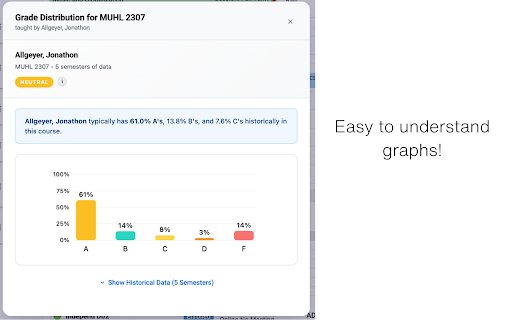
📊 See Real Grade Distributions
Instantly view the historical percentage of A's, B's, C's, and F's for any professor and course. Our interactive charts make it easy to see grading patterns and identify the professors that fit your learning style.
📄 Access a Complete Syllabi Archive
Know exactly what a course requires before you enroll. Browse a massive library of past syllabi to see assignment types, exam schedules, and grading policies from previous semesters.
🧠 Intelligent Professor Insights
When multiple instructors are listed, our algorithm highlights the most likely professor based on historical teaching data, ensuring you see the most relevant and accurate information.
🔒 Secure & Private by Design
Your privacy is paramount. GradeRaider requires secure authentication, uses encrypted API communication, and never stores your personal academic records or tracks your activity.
How It Works:
1. Install GradeRaider and create your secure account.
2. Open the TTU Schedule Builder as you normally would.
3. Discover Enhanced Course Data: Buttons for grade history and syllabi appear automatically.
4. Plan with Confidence: Click to explore deep insights and build your ideal schedule.
5. Unlock Your GPA's Full Potential
Join thousands of TTU students who are taking control of their academic journey. Install GradeRaider today and transform uncertainty into strategy.



Reviews
Loading reviews...
Permissions (3)
Permissions
activeTabℹ Can access the current tab when you click the extension alarmsℹ Can schedule periodic background tasks storageℹ Can store data locally in your browser
Details
| Version | 2.0.1 |
| Updated | Jun 23, 2025 |
| Size | 47.98KiB |
| First Seen | Mar 22, 2026 |
Popular in education

Kami for Google Chrome™
by Kami
17M
★ 4.56
education
17M
★ 4.56
education

Language Reactor
by Dioco
2M
★ 4.20
education
2M
★ 4.20
education

Speechify — Text to Speech
by Speechify
1M
★ 4.59
education
1M
★ 4.59
education

LibKey Nomad
by Third Iron LLC
1M
★ 4.71
education
1M
★ 4.71
education

xFanatical Safe Doc
by xFanatical
700K
★ 1.46
education
700K
★ 1.46
education
Popular Extensions

Adobe Acrobat: PDF edit, convert, sign tools
by Adobe Inc.
330M
★ 4.40
workflow
330M
★ 4.40
workflow

Chrome Remote Desktop
by Chrome Remote Desktop Release Managers
38M
★ 3.14
workflow
38M
★ 3.14
workflow

Cisco Webex Extension
by cisco.chromestore
24M
★ 2.34
social
24M
★ 2.34
social
Kami for Google Chrome™
by Kami
17M
★ 4.56
education
17M
★ 4.56
education

Read&Write for Google Chrome™
by Texthelp
17M
★ 3.44
accessibility
17M
★ 3.44
accessibility