
⚠️Not updated in over a year
Description
Want to save a webpage or an image? This one-click webpage screenshot Chrome extension has got you covered! Tired of scrolling through pages and images? It allows you to capture a snapshot of any webpage from top to bottom with just one click.
It's a highly useful extension that can be easily added to Chrome, saving you time and energy. Capture full articles, research materials, or any information for reference or sharing effortlessly.
Key Features of the Web Screenshot Chrome Extension:
Quick Activation: Simply click the activation button to take full-page or article screenshots instantly.
Comprehensive Capture: Capture entire pages without needing to scroll or take multiple screenshots.
Efficiency Boost: Streamline your workflow by efficiently collecting images from the internet, saving time and energy.
Hassle-Free Integration: Easy installation extends Chrome functionality, simplifying screenshot capture of anything that catches your eye.
How to Use the Extension:
1. Activate the Extension:
First, install the extension from the Chrome Web Store. Click the Web Screenshot Chrome extension icon in the browser toolbar to activate it.
2. Capture Web Content:
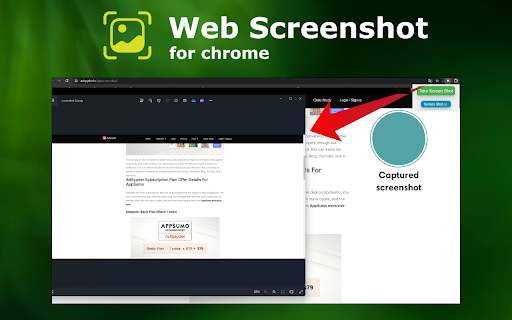
Once activated, browse the webpage or article you want to capture. Click the extension icon to open the main page of the extension, then click again to take a screenshot.
3. Access Full Page Snapshot:
Capture the entire webpage from top to bottom to ensure a comprehensive view of the content.
4. Save and Share:
After taking the screenshot, copy it to your computer or device for later use, or share it via email, instant messenger, or your preferred social network.
Why Web Screenshot for Chrome is Useful:
The Web Screenshot for Chrome extension enhances the process of capturing web content, making it invaluable for professionals across various fields, students, and researchers. It saves time by efficiently capturing data, facilitates academic referencing for students, and aids professionals in content creation without manual effort.
For Whom It Is Useful:
It is highly beneficial for research, curation, and archiving tasks performed by marketers, designers, and any web user. Its user-friendly interface ensures accessibility for all types of users, enhancing efficiency and enjoyment of web browsing.
FAQs:
1. How do I enable the extension?
The extension works directly in the Chrome browser without additional installations. Simply click on the icon to activate it.
2. Do I need to scroll the page to capture the entire content?
No, the extension automatically captures the entire page from top to bottom without manual scrolling.
3. Does it work with browsers other than Chrome?
Currently, the extension is specifically developed for Chrome and may not be compatible with other browsers.
4. Where and how can I access captured screenshots?
Captured screenshots are saved directly on your device, making them easily accessible whenever needed.
Reviews
Loading reviews...
Permissions (2)
Permissions
activeTabℹ Can access the current tab when you click the extension notificationsℹ Can show desktop notifications
Details
| Version | 1.0.0 |
| Updated | Jul 2, 2024 |
| Size | 75.44KiB |
| First Seen | Mar 22, 2026 |
Popular in tools

Monica: All-In-One AI Assist & Smartest AI Agent
by Monica Team
3M
★ 4.89
tools
3M
★ 4.89
tools

Ad Blocker: Stands AdBlocker
by Stands
3M
★ 4.79
tools
3M
★ 4.79
tools

WPS浏览器助手:文档在线阅读编辑
by 金山PDF
2M
★ 2.90
tools
2M
★ 2.90
tools

Pie Adblock - A Powerful Free Ad Blocker
by Pie Extensions
2M
★ 4.90
tools
2M
★ 4.90
tools

Ecosia - The search engine that plants trees
by Ecosia GmbH
1M
★ 4.70
tools
1M
★ 4.70
tools
Popular Extensions

Adobe Acrobat: PDF edit, convert, sign tools
by Adobe Inc.
330M
★ 4.40
workflow
330M
★ 4.40
workflow

Chrome Remote Desktop
by Chrome Remote Desktop Release Managers
38M
★ 3.14
workflow
38M
★ 3.14
workflow

Cisco Webex Extension
by cisco.chromestore
24M
★ 2.34
social
24M
★ 2.34
social

Kami for Google Chrome™
by Kami
17M
★ 4.56
education
17M
★ 4.56
education

Read&Write for Google Chrome™
by Texthelp
17M
★ 3.44
accessibility
17M
★ 3.44
accessibility