
⚠️Not updated in over 2 years
Description
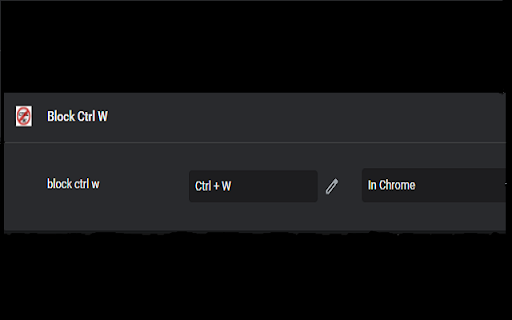
To block Ctrl + w and send notify via post message
#Usage
1. Add Apps to Chrome
2. Open chrome://extensions/shortcuts
3. Find out “Block Ctrl W”
4. Click the Edit button
5. Press Ctrl & W button at the same time
Reviews (3 cached)
★☆☆☆☆2026-02-06
Sean Mittler
you cant block Ctrl and w because when you go to input the command in editing, you HAVE to press Ctrl W which will then CLOSE THE TAB you have opened to block Ctrl w
★☆☆☆☆2026-01-04
Apoz Apoz
doesn't work.
★☆☆☆☆2025-11-09
Samuel Badley
did not work and it had permission
Permissions (1)
Permissions
activeTabℹ Can access the current tab when you click the extension
Details
| Version | 1.0.3 |
| Updated | Jun 26, 2022 |
| Size | 16.26KiB |
| First Seen | Mar 22, 2026 |
Popular in developer

Lighthouse
by lighthouse-extension-owners
1M
★ 4.42
developer
1M
★ 4.42
developer

Контур.Плагин
by kontur.extension
1M
★ 3.11
developer
1M
★ 3.11
developer

Similarweb - Website Traffic & SEO Checker
by Similarweb
1M
★ 4.66
developer
1M
★ 4.66
developer

Clear Cache
by Little Void LLC (Ben Bojko)
1M
★ 4.45
developer
1M
★ 4.45
developer

SEO META in 1 CLICK
by Bilal Hadri
900K
★ 4.87
developer
900K
★ 4.87
developer
Popular Extensions

Adobe Acrobat: PDF edit, convert, sign tools
by Adobe Inc.
330M
★ 4.40
workflow
330M
★ 4.40
workflow

Chrome Remote Desktop
by Chrome Remote Desktop Release Managers
38M
★ 3.14
workflow
38M
★ 3.14
workflow

Cisco Webex Extension
by cisco.chromestore
24M
★ 2.34
social
24M
★ 2.34
social

Kami for Google Chrome™
by Kami
17M
★ 4.56
education
17M
★ 4.56
education

Read&Write for Google Chrome™
by Texthelp
17M
★ 3.44
accessibility
17M
★ 3.44
accessibility