
Description
Generate valid South African Revenue Service reference numbers for systems testing.
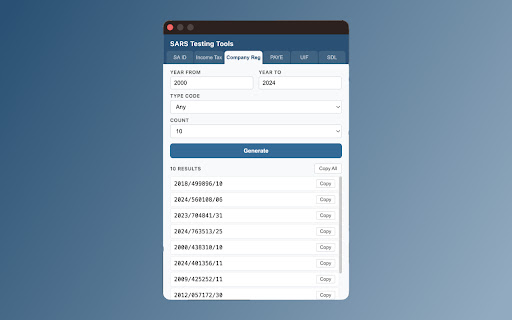
SARS Testing Tools is a lightweight Chrome extension that generates structurally valid South African tax-related reference numbers. Built for QA testers, developers, and anyone who needs realistic test data for South African financial and tax systems.
What it generates
- SA ID Numbers: 13-digit identity numbers with correct Luhn check digits. Configure date of birth range, gender (male/female/any), and citizenship status (SA citizen/permanent resident).
- Income Tax Numbers: 10-digit personal income tax reference numbers with valid SARS Modulus 10 check digits. Filter by starting digit (0, 1, 2, 3, or 9).
- Company Registration Numbers: Formatted as YYYY/NNNNNN/XX with 14 supported type codes including Pty Ltd (07), Ltd Public (08), Close Corporation (10), Co-operative (24), and more. Configure year range and type code.
- PAYE Reference Numbers: 10-digit Pay As You Earn reference numbers with valid check digits. Filter by starting digit (0, 1, 2, 3, 7, or 9).
- UIF Reference Numbers: Unemployment Insurance Fund numbers in the format U + 9 digits with valid SARS Modulus 10 check digits.
- SDL Reference Numbers: Skills Development Levy numbers in the format L + 9 digits with valid SARS Modulus 10 check digits.
Features
- Clean tabbed interface: switch between all six generators instantly
- Configurable filters: date ranges, gender, citizenship, starting digits, company type codes
- Batch generation: generate 1, 5, 10, or 25 numbers at a time
- One-click copy: copy individual results or all results at once
- Correct validation: all check digits are computed using the same algorithms used in production tax systems (Luhn for SA IDs, SARS Modulus 10 for tax numbers)
- No network requests: everything runs locally in your browser
- No data collection: your generated numbers are never sent anywhere
Who is this for?
- QA testers validating South African tax and financial systems
- Developers building applications that accept SA tax reference numbers
- Anyone who needs structurally valid test data without using real personal information
Validation algorithms
SA ID numbers use the standard Luhn algorithm. The 13th digit is a check digit computed over the first 12 digits, matching the validation used by the South African Department of Home Affairs.
Income Tax, PAYE, UIF, and SDL numbers use the SARS Modulus 10 algorithm: digits at even positions are doubled (subtract 9 if the result exceeds 9), all values are summed, and the check digit is (10 - sum mod 10) mod 10. For PAYE, UIF, and SDL numbers, the first character is substituted with 4 before computing the check digit.
Company Registration numbers follow the YYYY/NNNNNN/XX format with valid type codes as defined by CIPC.
Important disclaimer
All generated numbers are for testing purposes only. They are structurally valid but do not correspond to real individuals, companies, or tax registrations. Do not use them for fraud, misrepresentation, or any unlawful purpose.
Open source
This extension is open source under the MIT license. Contributions and feedback are welcome on GitHub (https://github.com/penkin/SARS-Testing-Tools-Browser-Extension)




Reviews
Loading reviews...
Permissions (1)
Permissions
clipboardWriteℹ Can write to your clipboard
Details
| Version | 1.0.0 |
| Updated | Feb 13, 2026 |
| Size | 16.53KiB |
| First Seen | Mar 22, 2026 |
Popular in developer

Lighthouse
by lighthouse-extension-owners
1M
★ 4.42
developer
1M
★ 4.42
developer

Контур.Плагин
by kontur.extension
1M
★ 3.11
developer
1M
★ 3.11
developer

Similarweb - Website Traffic & SEO Checker
by Similarweb
1M
★ 4.66
developer
1M
★ 4.66
developer

Clear Cache
by Little Void LLC (Ben Bojko)
1M
★ 4.45
developer
1M
★ 4.45
developer

SEO META in 1 CLICK
by Bilal Hadri
900K
★ 4.87
developer
900K
★ 4.87
developer
Popular Extensions

Adobe Acrobat: PDF edit, convert, sign tools
by Adobe Inc.
330M
★ 4.40
workflow
330M
★ 4.40
workflow

Chrome Remote Desktop
by Chrome Remote Desktop Release Managers
38M
★ 3.14
workflow
38M
★ 3.14
workflow

Cisco Webex Extension
by cisco.chromestore
24M
★ 2.34
social
24M
★ 2.34
social

Kami for Google Chrome™
by Kami
17M
★ 4.56
education
17M
★ 4.56
education

Read&Write for Google Chrome™
by Texthelp
17M
★ 3.44
accessibility
17M
★ 3.44
accessibility