Unleash the power of next-generation AI with our cutting-edge Chrome plugin designed to revolutionize the way you write online. Whether you're drafting emails, composing blog posts, or engaging in social media dialogue, our plugin ensures your writing is polished, professional, and precisely tailored to your desired tone. With a simple click, transform any text into a masterpiece of clarity and style.
Key Features:
Instant Grammar Fixes: Say goodbye to typos, grammatical errors, and punctuation mistakes. Our advanced AI algorithm scans your text in real-time, offering corrections that ensure your writing is flawless. With just one click, elevate the quality of your work, saving time and boosting your confidence.
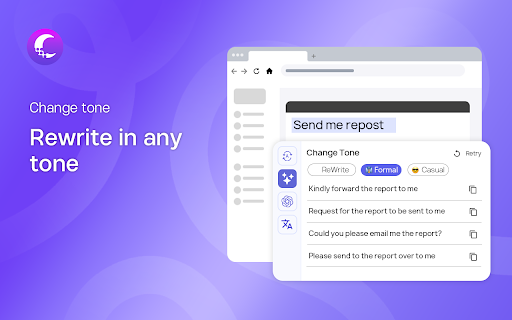
Tone Transformation: Adjust the tone of your text to match your message's intent. Whether you need to sound more professional, friendly, persuasive, or neutral, our plugin gives you the power to reshape your writing style without losing your personal touch. Tailor your communication to resonate with your audience, enhancing engagement and impact.
Ask AI: Our 'Ask AI' feature is your personal writing assistant, ready to help with any writing challenge. Stuck on a sentence? Need a creative boost? Simply use the 'Ask AI' option to generate suggestions, ideas, and even whole paragraphs that seamlessly blend with your work. It's like having a professional writer by your side, anytime, anywhere.
Effortless Integration:
Our plugin seamlessly integrates with any text input box across the web, making it incredibly versatile and user-friendly. Whether you're writing on social media platforms, email clients, or content management systems, our tool is there to enhance your writing with unparalleled ease.
Why Choose Us?
Boost Your Productivity: Streamline your writing process with AI-powered tools that reduce errors and enhance clarity, freeing up your time for more important tasks.
Enhance Your Communication: Improve the effectiveness of your communication by fine-tuning your writing style and tone to match your audience's expectations.
AI at Your Fingertips: Leverage the latest advancements in AI technology to overcome writing challenges and unlock your creative potential.
Get Started Today:
Elevate your writing to new heights with our Chrome plugin. Whether you're a student, professional, content creator, or anyone who writes online, our tool is designed to help you communicate more effectively and efficiently. Install now and experience the future of writing with AI.