
Description
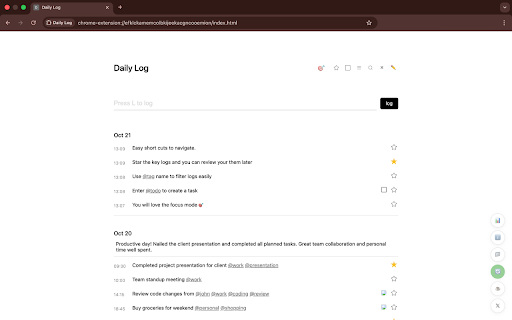
Daily Log is a simple new-tab extension to capture what you do, as you do it—so your day doesn’t blur together.
If you’ve ever ended a day thinking “What did I even do?”, this helps you remember—and keep moving.
What it does:
- Log quick entries with tags, todos, and “star” key moments.
- You can also tag things using @tagname. Think projects, people, or anything you might refer to often. You can filter by tags as well.
- Clean Focus mode for just today.
- Keyboard shortcuts: Log (L), Todos (T), Search (S), Focus (F), Star (W).
- Optional reminder chime (hourly or a custom interval).
- Floating quick-access button across sites.
- Dark mode.
Why install:
New tabs are underused. Daily Log turns that space into a lightweight tracker so you stay focused and see real progress—without fiddly setups or cloud lock-in.
Your data:
- Stored locally on your device.
- Export CSV anytime.
- Automatic JSON backups (weekly or every 50 logs).
- Import past data.
- Option to disable auto new-tab; open via the extension button instead.
If you’ve ever ended a day thinking “What did I even do?”, this helps you remember—and keep moving.Daily Log is a simple new-tab extension to capture what you do, as you do it—so your day doesn’t blur together.
What it does:
- Log quick entries with tags, todos, and “star” key moments.
- Clean Focus mode for just today.
- Keyboard shortcuts: Log (L), Todos (T), Search (S), Focus (F), Star (W).
- Optional reminder chime (hourly or a custom interval).
- Floating quick-access button across sites.
- Dark mode.
Why install:
New tabs are underused. Daily Log turns that space into a lightweight tracker so you stay focused and see real progress—without fiddly setups or cloud lock-in.
Your data:
- Stored locally on your device.
- Export CSV anytime.
- Automatic JSON backups (weekly or every 50 logs).
- Import past data.
- Option to disable auto new-tab; open via the extension button instead.



Reviews
Loading reviews...
Permissions (6)
Permissions
activeTabℹ Can access the current tab when you click the extension alarmsℹ Can schedule periodic background tasks downloadsℹ Can manage and monitor downloads notificationsℹ Can show desktop notifications storageℹ Can store data locally in your browser tabsℹ Can see your open tabs and their URLs
Details
| Version | 1.26 |
| Updated | Nov 18, 2025 |
| Size | 75.13KiB |
| First Seen | Mar 27, 2026 |
More by Nrmlrah

Popular in workflow

Adobe Acrobat: PDF edit, convert, sign tools
by Adobe Inc.
331M
★ 4.40
workflow
331M
★ 4.40
workflow

Chrome Remote Desktop
by Chrome Remote Desktop Release Managers
38M
★ 3.14
workflow
38M
★ 3.14
workflow

Microsoft Single Sign On
by Microsoft
36M
★ 2.27
workflow
36M
★ 2.27
workflow

MetaMask
by metamask
13M
★ 2.68
workflow
13M
★ 2.68
workflow

Microsoft Power Automate
by Microsoft Corporation
10M
★ 1.99
workflow
10M
★ 1.99
workflow
Popular Extensions
Adobe Acrobat: PDF edit, convert, sign tools
by Adobe Inc.
331M
★ 4.40
workflow
331M
★ 4.40
workflow

Grammarly: AI Writing Assistant and Grammar Checker App
by Grammarly
42M
★ 4.50
communication
42M
★ 4.50
communication
Chrome Remote Desktop
by Chrome Remote Desktop Release Managers
38M
★ 3.14
workflow
38M
★ 3.14
workflow
Microsoft Single Sign On
by Microsoft
36M
★ 2.27
workflow
36M
★ 2.27
workflow

Cisco Webex Extension
by cisco.chromestore
23M
★ 2.34
social
23M
★ 2.34
social