
⚠️Not updated in over a year ⚠️Requests 1 sensitive permission
Description
Must have Chrome Extension For Amazon Sellers!
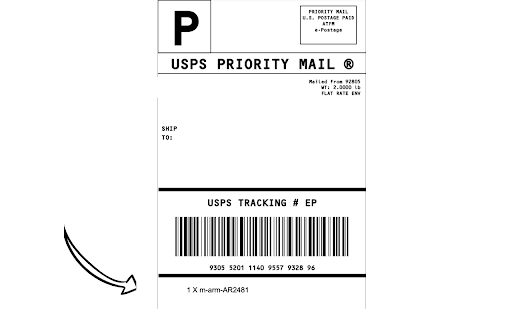
By automating the process of adding SKU and quantity information to your shipping label, you'll save valuable time and eliminate errors.
How it works
Get started with ShipCenter today and simplify your shipping process! Here's how it works:
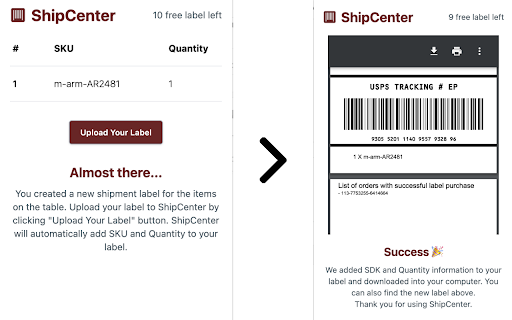
- Download and enable the ShipCenter extension on Chrome.
- Create a shipment label for your customer in your Amazon Seller Central account.
- Open the ShipCenter extension and confirm that it has accurately detected the items in your shipment.
- Upload your shipment label to ShipCenter. Our system will automatically add the SKU and Quantity information to the label
https://ship-center-web.pages.dev

Reviews
Loading reviews...
Permissions (2)
Permissions
storageℹ Can store data locally in your browser webRequestℹ Can observe and analyze network traffic
Details
| Version | 0.0.5 |
| Updated | Apr 14, 2024 |
| Size | 371KiB |
| First Seen | Mar 27, 2026 |
Popular in workflow

Adobe Acrobat: PDF edit, convert, sign tools
by Adobe Inc.
331M
★ 4.40
workflow
331M
★ 4.40
workflow

Chrome Remote Desktop
by Chrome Remote Desktop Release Managers
38M
★ 3.14
workflow
38M
★ 3.14
workflow

Microsoft Single Sign On
by Microsoft
36M
★ 2.27
workflow
36M
★ 2.27
workflow

MetaMask
by metamask
13M
★ 2.68
workflow
13M
★ 2.68
workflow

Microsoft Power Automate
by Microsoft Corporation
10M
★ 1.99
workflow
10M
★ 1.99
workflow
Popular Extensions
Adobe Acrobat: PDF edit, convert, sign tools
by Adobe Inc.
331M
★ 4.40
workflow
331M
★ 4.40
workflow

Grammarly: AI Writing Assistant and Grammar Checker App
by Grammarly
42M
★ 4.50
communication
42M
★ 4.50
communication
Chrome Remote Desktop
by Chrome Remote Desktop Release Managers
38M
★ 3.14
workflow
38M
★ 3.14
workflow
Microsoft Single Sign On
by Microsoft
36M
★ 2.27
workflow
36M
★ 2.27
workflow

Cisco Webex Extension
by cisco.chromestore
23M
★ 2.34
social
23M
★ 2.34
social