
GlobalConnect for Google Chrome™
v1.0.0.8 Updated Jan 4, 2025 314KiB
⚠️Not updated in over a year
Description
GlobalConnect is an image enablement tool for web based line of business apps. User's of Square 9's SmartSearch and GlobalSearch ECM Platforms can leverage GlobalConnect for quick and easy document access from any web based application.
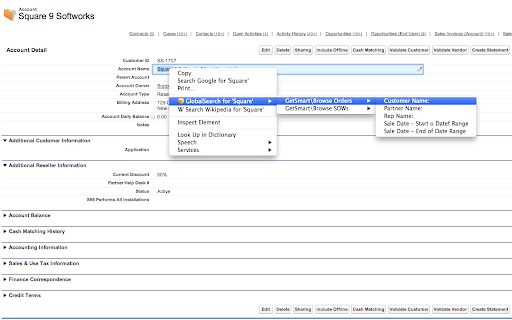
Simply highlight a piece of text in the browser, right click, and a list of enabled searches will be displayed beneath the "GlobalSearch for" content menu item.
Before using GlobalConnect, you must configure it to use your installation of GlobalSearch from the extension's option page. For demo installs use "http://localhost" which is the default setting. Once the url is set, press the Update Searches button to load your searches into the menu system. *Note: Searches must be configured as Image XChange searches in order to use this extension. Any time searches are added or changed, you will need to refresh the searches from the extension's options page for them to reflect in the application.
Reviews
Loading reviews...
Permissions (4)
Permissions
activeTabℹ Can access the current tab when you click the extension contextMenusℹ Can add items to the right-click menu storageℹ Can store data locally in your browser tabsℹ Can see your open tabs and their URLs
Details
| Version | 1.0.0.8 |
| Updated | Jan 4, 2025 |
| Size | 314KiB |
| First Seen | Mar 27, 2026 |
Popular in workflow

Adobe Acrobat: PDF edit, convert, sign tools
by Adobe Inc.
331M
★ 4.40
workflow
331M
★ 4.40
workflow

Chrome Remote Desktop
by Chrome Remote Desktop Release Managers
38M
★ 3.14
workflow
38M
★ 3.14
workflow

Microsoft Single Sign On
by Microsoft
36M
★ 2.27
workflow
36M
★ 2.27
workflow

MetaMask
by metamask
13M
★ 2.68
workflow
13M
★ 2.68
workflow

Microsoft Power Automate
by Microsoft Corporation
10M
★ 1.99
workflow
10M
★ 1.99
workflow
Popular Extensions
Adobe Acrobat: PDF edit, convert, sign tools
by Adobe Inc.
331M
★ 4.40
workflow
331M
★ 4.40
workflow

Grammarly: AI Writing Assistant and Grammar Checker App
by Grammarly
42M
★ 4.50
communication
42M
★ 4.50
communication
Chrome Remote Desktop
by Chrome Remote Desktop Release Managers
38M
★ 3.14
workflow
38M
★ 3.14
workflow
Microsoft Single Sign On
by Microsoft
36M
★ 2.27
workflow
36M
★ 2.27
workflow

Cisco Webex Extension
by cisco.chromestore
23M
★ 2.34
social
23M
★ 2.34
social