
VideoMark - Take notes on YouTube, Coursera
v0.0.33 Updated Nov 3, 2023 4.41MiB
⚠️Not updated in over 2 years ⚠️Requests 1 sensitive permission
Description
🌟 Now Supporting ChatGPT-Assisted Video Summary Generation! 🌟
🌟 Now Supporting Udemy and Coursera Video Notes! 🌟
📝 Export Your Notes to Google Docs Instantly! 📝
+++++++
VideoMark is your go-to solution for annotating videos across platforms. With a user-friendly interface and intuitive drawing tools, you can easily take notes directly on YouTube videos and highlight key frames.
+++++++
🎯 What Makes VideoMark Unique?
- Capture and Save: Effortlessly save subtitles and screenshots, making it an ideal tool for educational purposes and capturing essential video content.
- Your Data, Your Rules: Unlike other note-taking tools, we respect your privacy. We neither own your notes nor your videos, and we promise never to display ads or sell your information.
+++++++
🪄 Features
- 🖍 Draw annotations on online videos
- 📝 Take notes on YouTube, Coursera, and Udemy
- 📸 Save screenshots and subtitles directly from videos
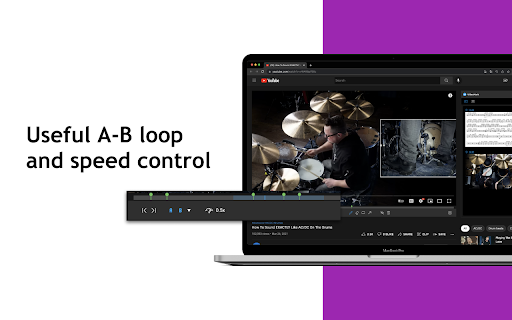
- ⏩ Convenient speed control and A-B loop features
- ☁️ Autosave to Google Drive
- 🏷 Use hashtags to categorize your notes
- 📤 Export options include PDF, TXT, and Word
+++++++
🌝 Who Can Benefit?
🎓 Learners
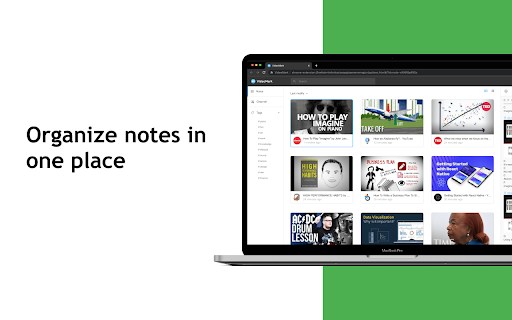
Whether you're acquiring new skills in tech, design, or music through platforms like YouTube, Coursera, or Udemy, VideoMark consolidates your video notes in one place. Focus on gaining insights and inspiration to transform your life through education.
🎥 YouTubers
Struggling to manage a plethora of video clips and screenshots? VideoMark allows you to quickly browse, tag, and organize your content effortlessly.
+++++++
🛠 Coming Soon
- 🔄 Enhanced autosave options, including Dropbox, Evernote, and Notion
- 🔍 Full-Text Search Capability
+++++++
📨 Support
For additional help and information, visit VideoMark.app
+++++++
😘 Love VideoMark? Rate Us!
Support VideoMark by leaving us a ★★★★★ 5-STAR REVIEW!
+++++++



Reviews (2 cached)
★☆☆☆☆2022-05-30
Dill
everytime i pause and want to play my video instead it annotates it. wish there was an option to just turn off annotation stuff bc i just want to write notes
★★☆☆☆2024-07-30
Mario Garrote Filho
The extension would be ver helpful if the text do not become invisible after formating clickin on H2 or H1. If the extension start to work properly I am inclined to subscribe anually
Permissions (8)
Permissions
cookiesℹ Can read and modify browser cookies identityℹ Can use your Google account identity notificationsℹ Can show desktop notifications storageℹ Can store data locally in your browser tabsℹ Can see your open tabs and their URLs unlimitedStorage
Host Permissions
*://*.coursera.org/ℹ Can access coursera.org websites *://*.udemycdn.com/*ℹ Can access udemycdn.com websites
Details
| Version | 0.0.33 |
| Updated | Nov 3, 2023 |
| Size | 4.41MiB |
| First Seen | Mar 21, 2026 |
Popular in workflow

Adobe Acrobat: PDF edit, convert, sign tools
by Adobe Inc.
330M
★ 4.40
workflow
330M
★ 4.40
workflow

Chrome Remote Desktop
by Chrome Remote Desktop Release Managers
38M
★ 3.14
workflow
38M
★ 3.14
workflow

Screencastify - Screen Video Recorder
by castify-ext-dev
9M
★ 3.95
workflow
9M
★ 3.95
workflow

Mendeley Web Importer
by Mendeley
3M
★ 2.25
workflow
3M
★ 2.25
workflow

Web PKI
by Lacuna Software
3M
★ 3.01
workflow
3M
★ 3.01
workflow
Popular Extensions
Adobe Acrobat: PDF edit, convert, sign tools
by Adobe Inc.
330M
★ 4.40
workflow
330M
★ 4.40
workflow
Chrome Remote Desktop
by Chrome Remote Desktop Release Managers
38M
★ 3.14
workflow
38M
★ 3.14
workflow

Cisco Webex Extension
by cisco.chromestore
24M
★ 2.34
social
24M
★ 2.34
social

Kami for Google Chrome™
by Kami
17M
★ 4.56
education
17M
★ 4.56
education

Read&Write for Google Chrome™
by Texthelp
17M
★ 3.44
accessibility
17M
★ 3.44
accessibility