
⚠️Requests 1 sensitive permission ⚠️Very few reviews for its user base
Description
Use the PLANERGY CheckOut extension to create purchase requisitions in PLANERGY from your shopping cart on thousands of ecommerce websites.
What does PLANERGY CheckOut do?
-----------------------------------------------------------
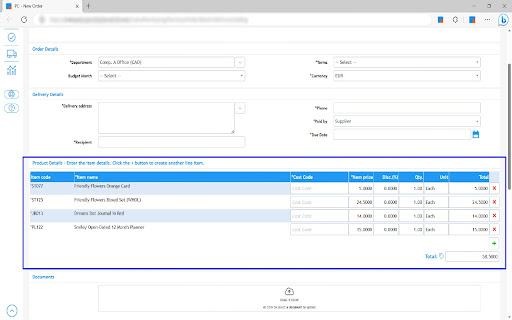
PLANERGY CheckOut allows you to shop on your supplier’s website, then with the click of a button, import the entire shopping cart into a purchase requisition in PLANERGY ready to go through your company’s approval workflows.
✓ Save Time
No more time wasted with copy & paste of item details into purchase requisitions.
✓ Accurate Information
Correct data imported into PLANERGY every time with no manual errors.
✓ Consumer Experience
Prepare your order just like you are used to on any leading ecommerce website.
✓ Millions of products
Across thousands of sites you have access to millions of products to choose from.
Which supplier websites can I use with PLANERGY CheckOut?
--------------------------------------------------------------------------------------------------
PLANERGY CheckOut will work with the majority of supplier websites. The extension is compatible with 13 of the ecommerce platforms most commonly used by suppliers including Shopify, 3DCart, BigCommerce, and WooCommerce. It also works with Amazon as well as many custom ecommerce sites.
This includes some of the largest global suppliers, key niche industry suppliers, and even many smaller local suppliers. Here is just a small sample of suppliers that are compatible with PLANERGY CheckOut:
• Staples (Office Supplies): Staples.com
• Lowes (Construction & DIY): Lowes.com
• Wayfair (Furniture & Decor): wayfair.com
• Fisher Scientific (Scientific & Biotechnology): www.fishersci.com
• Henry Schein (Medical and Dental Supplies): henryschein.com
How do I start using PLANERGY CheckOut?
---------------------------------------------------------------------
PLANERGY CheckOut requires that you have an active PLANERGY account. If you do not have active PLANERGY account, please visit planergy.com. If you already have PLANERGY account, follow these steps:
1. Request your PLANERGY account owner to enable PLANERGY CheckOut on your account in the ‘Control Panel > Integrations’ section
2. Make sure you’re using Google Chrome (or Microsoft Edge) as your browser
3. Download the PLANERGY CheckOut Chrome Extension from the Chrome Web Store
4. Login to your PLANERGY account in a Chrome browser tab
5. Shop on websites using any of the major ecommerce platforms, then import your shopping cart into a PLANERGY purchase requisition by pressing the ‘Submit To PLANERGY’ button in the PLANERGY CheckOut Chrome Extension


Reviews
Loading reviews...
Permissions (3)
Permissions
cookiesℹ Can read and modify browser cookies scriptingℹ Can inject scripts into web pages storageℹ Can store data locally in your browser
Details
| Version | 1.6 |
| Updated | Jun 29, 2025 |
| Size | 6.7MiB |
| First Seen | Mar 21, 2026 |
Popular in shopping

Smarty
by cesarlambino58
800K
★ 4.16
shopping
800K
★ 4.16
shopping

Alitools Shopping Assistant
by BDT GROUP Sp. z o.o.
400K
★ 4.54
shopping
400K
★ 4.54
shopping

DSers - AliExpress.com Product Importer
by dsers_official
400K
★ 4.99
shopping
400K
★ 4.99
shopping

帮您淘优惠
by xiaochengxu1
300K
★ 2.33
shopping
300K
★ 2.33
shopping

SellerAmp SAS - Amazon FBA Analysis Tool
by Seller Amp
100K
★ 4.35
shopping
100K
★ 4.35
shopping
Popular Extensions

Adobe Acrobat: PDF edit, convert, sign tools
by Adobe Inc.
330M
★ 4.40
workflow
330M
★ 4.40
workflow

Chrome Remote Desktop
by Chrome Remote Desktop Release Managers
38M
★ 3.14
workflow
38M
★ 3.14
workflow

Cisco Webex Extension
by cisco.chromestore
24M
★ 2.34
social
24M
★ 2.34
social

Kami for Google Chrome™
by Kami
17M
★ 4.56
education
17M
★ 4.56
education

Read&Write for Google Chrome™
by Texthelp
17M
★ 3.44
accessibility
17M
★ 3.44
accessibility