
Suite Projects Pro Script Custom Field Audit
v2.0 Updated Mar 8, 2025 20.2KiB
⚠️Not updated in over a year
Description
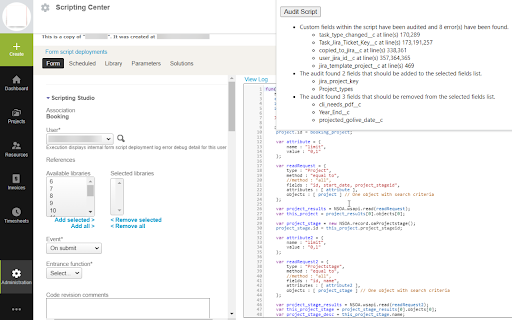
Use this chrome extension to audit the custom fields within a Suite Projects Pro script to validate if the field exists and is usable within the script. It is helpful when deploying scripts from the sandbox to production or troubleshooting why a script suddenly stopped working.
Additionally, it also identifies fields that should be added or removed from the 'Selected Custom Fields' list. By adding fields to this list, it will help admins identify where custom fields are used.
To use the tool:
1)Install the chrome extension
2)Navigate to Suite Projects Pro's scripting center and open a script (code must be visible in on the screen)
3)Click the extension icon from the list of available chrome extensions
4)Click "Audit Script"
5)The audit will run immediately and provide feedback in the extension pop-up window

Reviews
Loading reviews...
Details
| Version | 2.0 |
| Updated | Mar 8, 2025 |
| Size | 20.2KiB |
| First Seen | Mar 21, 2026 |
Popular in developer

React Developer Tools
by Meta
5M
★ 3.95
developer
5M
★ 3.95
developer

Lighthouse
by lighthouse-extension-owners
1M
★ 4.42
developer
1M
★ 4.42
developer

Контур.Плагин
by kontur.extension
1M
★ 3.11
developer
1M
★ 3.11
developer

Similarweb - Website Traffic & SEO Checker
by Similarweb
1M
★ 4.66
developer
1M
★ 4.66
developer

Clear Cache
by Little Void LLC (Ben Bojko)
1M
★ 4.45
developer
1M
★ 4.45
developer
Popular Extensions

Adobe Acrobat: PDF edit, convert, sign tools
by Adobe Inc.
330M
★ 4.40
workflow
330M
★ 4.40
workflow

Chrome Remote Desktop
by Chrome Remote Desktop Release Managers
38M
★ 3.14
workflow
38M
★ 3.14
workflow

Cisco Webex Extension
by cisco.chromestore
24M
★ 2.34
social
24M
★ 2.34
social

Kami for Google Chrome™
by Kami
17M
★ 4.56
education
17M
★ 4.56
education

Read&Write for Google Chrome™
by Texthelp
17M
★ 3.44
accessibility
17M
★ 3.44
accessibility