
Description
Smart-autoFiller is a smart assistant that reads job application forms, understands the questions, and fills them for you using your resume details and AI-generated answers. It dramatically reduces the time you spend applying, improves consistency, and works across major ATS platforms and many employer career sites.
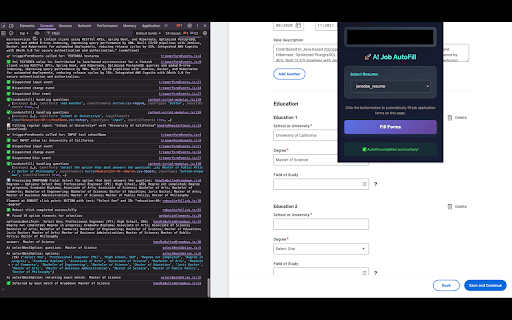
The autofiller intelligently detects fields of all kinds—inputs, dropdowns, radios, checkboxes, text areas, file uploads, and even button-based selectors. It infers the real question behind each field using nearby text, ARIA labels, and page structure, then fills it with the most relevant data from your saved resume profile. For open-ended questions, it can generate concise, context-aware responses using your experience and skills.
It doesn’t just guess. The extension selects the best option in dropdowns and radios, handles search/select and combobox widgets, recognizes consent and agreement checkboxes, and attaches your resume where supported. It remembers what worked before with an answer cache that supports both exact matches and regex patterns, so it gets better the more you use it.
Using it is simple. Log in from the popup, choose your resume profile, and click “Fill Forms” on a job page. The extension scans the page and completes fields automatically, with clear status messaging. You maintain control and can review before submitting; auto-submit is optional.
Your privacy matters. Your resume data, settings, and answer cache are stored locally in your browser. If you enable AI answers, your ai API key is stored locally and used only to fulfill your requests with the AI provider. We do not sell your data.
The extension requests only the permissions it needs: storage to save your preferences and cache, active tab and scripting to read and fill forms on the current page, and access to `api.openai.com` when AI features are used. Core autofill and caching are free to use; AI-powered answers are bring-your-own-key.
Get started by installing the extension, logging in from the popup, selecting a resume, and—optionally—adding your ai API key. Then navigate to a job application and click “Fill Forms” to experience faster, more accurate applications. If you need help or have feedback, reach out via the extension’s support link.
Keywords: Smart-autoFiller, job autofill, ATS autofill, AI form filler, job application assistant, resume autofill, Greenhouse, Workday, Lever, SmartRecruiters, LinkedIn jobs, productivity, automation.


Reviews
Loading reviews...
Permissions (4)
Permissions
activeTabℹ Can access the current tab when you click the extension scriptingℹ Can inject scripts into web pages storageℹ Can store data locally in your browser tabsℹ Can see your open tabs and their URLs
Details
| Version | 3.0.1 |
| Updated | Aug 29, 2025 |
| Size | 3.52MiB |
| First Seen | Mar 24, 2026 |
Popular in developer

Lighthouse
by lighthouse-extension-owners
1M
★ 4.42
developer
1M
★ 4.42
developer

Контур.Плагин
by kontur.extension
1M
★ 3.11
developer
1M
★ 3.11
developer

Similarweb - Website Traffic & SEO Checker
by Similarweb
1M
★ 4.66
developer
1M
★ 4.66
developer

Clear Cache
by Little Void LLC (Ben Bojko)
1M
★ 4.45
developer
1M
★ 4.45
developer

SEO META in 1 CLICK
by Bilal Hadri
900K
★ 4.87
developer
900K
★ 4.87
developer
Popular Extensions

Adobe Acrobat: PDF edit, convert, sign tools
by Adobe Inc.
330M
★ 4.40
workflow
330M
★ 4.40
workflow

Chrome Remote Desktop
by Chrome Remote Desktop Release Managers
38M
★ 3.14
workflow
38M
★ 3.14
workflow

Cisco Webex Extension
by cisco.chromestore
24M
★ 2.34
social
24M
★ 2.34
social

Kami for Google Chrome™
by Kami
17M
★ 4.56
education
17M
★ 4.56
education

Read&Write for Google Chrome™
by Texthelp
17M
★ 3.44
accessibility
17M
★ 3.44
accessibility