
✅Recently updated
Description
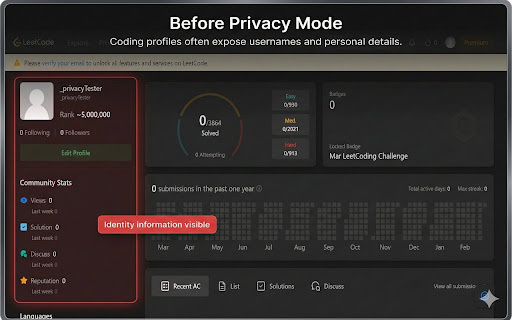
Code Profile Privacy Mode lets developers show their coding progress without exposing personal identity information.
When sharing your coding profile (LeetCode, Codeforces, CodeChef, HackerRank, etc.), the sidebar often reveals your username, profile links, followers, and other personal details. This extension hides those identity elements while keeping your problem-solving statistics visible.
Perfect for:
• sharing progress with friends or mentors
• screenshots for resumes or portfolios
• coding club presentations
• competitive programming discussions
Supported platforms:
• LeetCode
• Codeforces
• CodeChef
• HackerRank
• AtCoder
Features:
• Hide profile sidebar containing username and personal information
• Keep statistics like solved problems, difficulty distribution, ratings, and activity graphs visible
• Lightweight and fast – runs locally in your browser
• Simple toggle to enable or disable privacy mode
Privacy:
This extension does not collect, store, or transmit any user data. All processing happens locally in your browser.


Reviews
Loading reviews...
Permissions (2)
Permissions
activeTabℹ Can access the current tab when you click the extension storageℹ Can store data locally in your browser
Details
| Version | 1.0.0 |
| Updated | Mar 12, 2026 |
| Size | 17.97KiB |
| First Seen | Mar 22, 2026 |
Popular in developer

React Developer Tools
by Meta
5M
★ 3.95
developer
5M
★ 3.95
developer

Lighthouse
by lighthouse-extension-owners
1M
★ 4.42
developer
1M
★ 4.42
developer

Контур.Плагин
by kontur.extension
1M
★ 3.11
developer
1M
★ 3.11
developer

Similarweb - Website Traffic & SEO Checker
by Similarweb
1M
★ 4.66
developer
1M
★ 4.66
developer

Clear Cache
by Little Void LLC (Ben Bojko)
1M
★ 4.45
developer
1M
★ 4.45
developer
Popular Extensions

Adobe Acrobat: PDF edit, convert, sign tools
by Adobe Inc.
330M
★ 4.40
workflow
330M
★ 4.40
workflow

Chrome Remote Desktop
by Chrome Remote Desktop Release Managers
38M
★ 3.14
workflow
38M
★ 3.14
workflow

Cisco Webex Extension
by cisco.chromestore
24M
★ 2.34
social
24M
★ 2.34
social

Kami for Google Chrome™
by Kami
17M
★ 4.56
education
17M
★ 4.56
education

Read&Write for Google Chrome™
by Texthelp
17M
★ 3.44
accessibility
17M
★ 3.44
accessibility