
Website Blocker and Focus Mode
v1.0.1 Updated Jul 9, 2022 346KiB
⚠️Not updated in over 2 years
Description
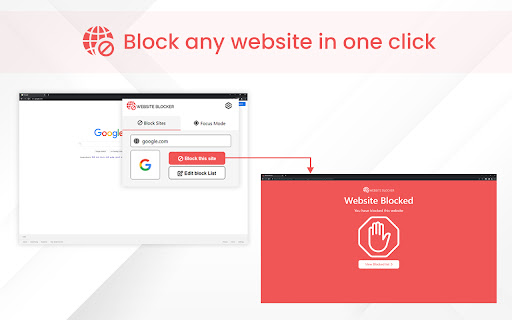
Website Blocker enables you to block any website you don't want to access from your laptop or desktop PC. Users can also block any website using Focus mode for a certain time.
Key Features of Website Blocker Extension:
>>Block any website that you do not want to access from your device
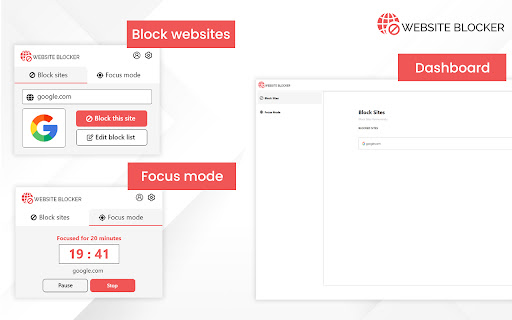
>>Block the website for a fixed period using Focus Mode
>>Users can block any number of websites both on normal mode and focus mode
>>Custom message on blocked pages
>>Time based website blocking
How To Use Website Blocker Extension to Block Websites :
>>Install the extension by clicking on “Add to Chrome” option
>>Visit any website that you want to block permanently or temporarily using Focus mode
>>Click on the extension icon to enable it
>>Now you will see two options Block sites & Focus Mode
>>You can edit Blocked website list anytime by clicking on Edit block list.
>>Select Focus Mode option only if you want to block the website temporarily or for a fixed time.
What is Focus Mode in Website blocking?
In Focus mode, users set a fixed amount of time they'd like to spend on particular websites before being blocked. So, if you spend too much time browsing, you can set a time limit so that you are reminded about the amount of time spent on the internet.
Why should you download Website Blocker Chrome Extension?
This extension allows you to focus on your work by restricting your time on internet browsing. That's why it's an excellent extension that can boost the efficiency of your work. It is also a great tool for students.
You can block any spammy website using this extension so that it does not waste your precious time in the future. Site blocker extension also helps you to increase your work efficiency and overall productivity.
Our productivity can be compromised by the free access of websites. There are times when it's better to switch off the outside world and concentrate on being productive. The Website Blocker Chrome extension helps you block websites in Chrome. This extension works perfectly both on the Windows and Mac platforms.

Reviews (2 cached)
★☆☆☆☆2023-04-10
Sowmya Prasad
This does not block any thing folks don't waste your time
★☆☆☆☆2023-02-12
Mark Figueroa
NOT WORKING
Permissions (4)
Permissions
alarmsℹ Can schedule periodic background tasks notificationsℹ Can show desktop notifications storageℹ Can store data locally in your browser tabsℹ Can see your open tabs and their URLs
Details
| Version | 1.0.1 |
| Updated | Jul 9, 2022 |
| Size | 346KiB |
| First Seen | Mar 23, 2026 |
Popular in education

Kami for Google Chrome™
by Kami
17M
★ 4.56
education
17M
★ 4.56
education

Language Reactor
by Dioco
2M
★ 4.20
education
2M
★ 4.20
education

Speechify — Text to Speech
by Speechify
1M
★ 4.59
education
1M
★ 4.59
education

LibKey Nomad
by Third Iron LLC
1M
★ 4.71
education
1M
★ 4.71
education

xFanatical Safe Doc
by xFanatical
700K
★ 1.46
education
700K
★ 1.46
education
Popular Extensions

Adobe Acrobat: PDF edit, convert, sign tools
by Adobe Inc.
330M
★ 4.40
workflow
330M
★ 4.40
workflow

Chrome Remote Desktop
by Chrome Remote Desktop Release Managers
38M
★ 3.14
workflow
38M
★ 3.14
workflow

Cisco Webex Extension
by cisco.chromestore
24M
★ 2.34
social
24M
★ 2.34
social
Kami for Google Chrome™
by Kami
17M
★ 4.56
education
17M
★ 4.56
education

Read&Write for Google Chrome™
by Texthelp
17M
★ 3.44
accessibility
17M
★ 3.44
accessibility