
⚠️Not updated in over 2 years ⚠️Below average rating
Description
Now you can easily extract code from videos without constantly switching tabs!
How to use:
Click the extension icon.
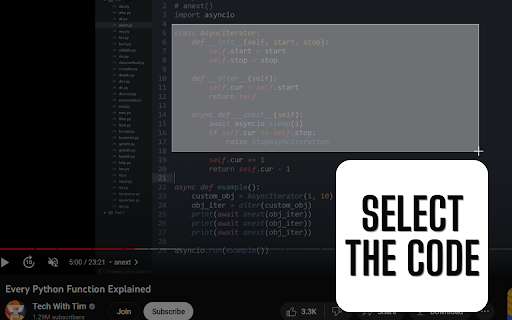
Select the code or click the extension icon again to cancel the selection.
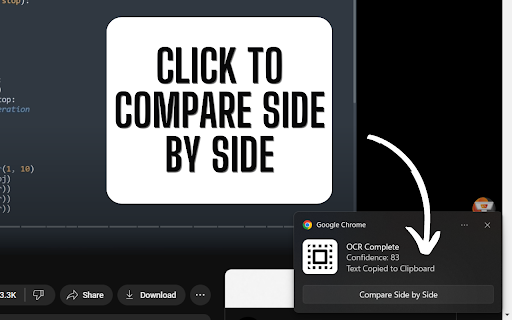
Wait for the processing to take place.
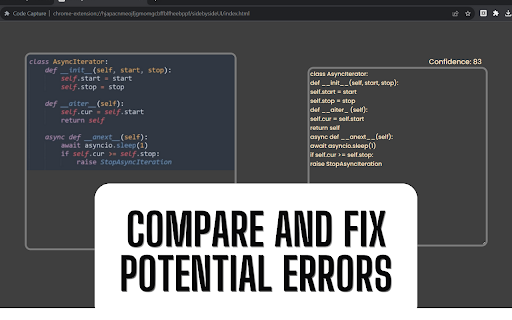
Once processed, the code will be copied to your clipboard. You can also compare the code and the image side by side to identify any potential errors.
Important:
--> The technology used to extract code from videos is called Tesseract, which may not always produce 100% accurate results.
--> The accuracy will depend on the type of image captured. For better results, ensure that the video is played at the highest quality before selecting the region.
--> All processing is performed locally, ensuring the privacy of your data.
Credits:
Links to some of the features used by this extension:
Jcrop: https://github.com/tapmodo/Jcrop
Tesseract.js: https://github.com/naptha/tesseract.js
Neuicons (for the display icon): https://www.svgrepo.com/svg/487767/select-all
Code Repository:
GitHub: https://github.com/KaifHalak/CodeCapture-Chrome-Extension-MV3

Reviews
Loading reviews...
Permissions (4)
Permissions
notificationsℹ Can show desktop notifications scriptingℹ Can inject scripts into web pages storageℹ Can store data locally in your browser tabsℹ Can see your open tabs and their URLs
Details
| Version | 0.0.0.1 |
| Updated | Aug 8, 2023 |
| Size | 124KiB |
| First Seen | Mar 26, 2026 |
More by Muhammad Usman

Popular in workflow

Adobe Acrobat: PDF edit, convert, sign tools
by Adobe Inc.
331M
★ 4.40
workflow
331M
★ 4.40
workflow

Chrome Remote Desktop
by Chrome Remote Desktop Release Managers
38M
★ 3.14
workflow
38M
★ 3.14
workflow

Microsoft Single Sign On
by Microsoft
36M
★ 2.27
workflow
36M
★ 2.27
workflow

MetaMask
by metamask
13M
★ 2.68
workflow
13M
★ 2.68
workflow

Microsoft Power Automate
by Microsoft Corporation
10M
★ 1.99
workflow
10M
★ 1.99
workflow
Popular Extensions
Adobe Acrobat: PDF edit, convert, sign tools
by Adobe Inc.
331M
★ 4.40
workflow
331M
★ 4.40
workflow
Chrome Remote Desktop
by Chrome Remote Desktop Release Managers
38M
★ 3.14
workflow
38M
★ 3.14
workflow
Microsoft Single Sign On
by Microsoft
36M
★ 2.27
workflow
36M
★ 2.27
workflow

Cisco Webex Extension
by cisco.chromestore
24M
★ 2.34
social
24M
★ 2.34
social

Kami for Google Chrome™
by Kami
19M
★ 4.56
education
19M
★ 4.56
education