
Native Speech: Pronunciation, Translation & Text to Speech
by NativeSpeech
v1.1.2 Updated Mar 11, 2026 310KiB
✅Recently updated
Description
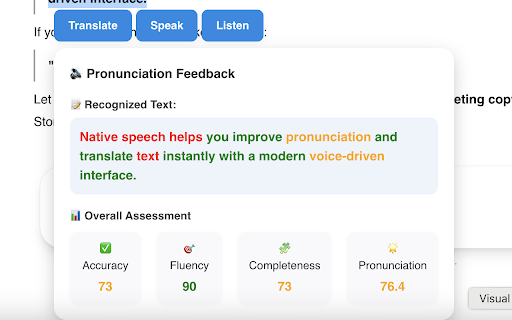
Practice speaking, listening, and translation with AI-powered real-time speech assessment. Select text on any website and start learning instantly. Supports all English accents and other languages.
Step-by-step Instructions:
1. Install the extension.
2. On any website, select any text — you should see a list of buttons: "Translate", "Listen", "Practice" and "Ask AI". Click any of them to get started.
3. Use the extension window to adjust the target language or select a preferred voice. You can also show or hide feature buttons.
4. Toggle Disable/Enable extension easily on right click.
Enjoy!


Reviews
Loading reviews...
Permissions (4)
Permissions
activeTabℹ Can access the current tab when you click the extension contextMenusℹ Can add items to the right-click menu scriptingℹ Can inject scripts into web pages storageℹ Can store data locally in your browser
Details
| Version | 1.1.2 |
| Updated | Mar 11, 2026 |
| Size | 310KiB |
| First Seen | Mar 22, 2026 |
Popular in education

Kami for Google Chrome™
by Kami
17M
★ 4.56
education
17M
★ 4.56
education

Language Reactor
by Dioco
2M
★ 4.20
education
2M
★ 4.20
education

xFanatical Safe Doc
by xFanatical
700K
★ 1.46
education
700K
★ 1.46
education

GPTZero: AI Detection & Writing Replay
by chrome-extension-publisher
400K
★ 4.57
education
400K
★ 4.57
education

You Shall Not Pass by Jim Tyler
by JamesTyler
400K
★ 1.44
education
400K
★ 1.44
education
Popular Extensions

Adobe Acrobat: PDF edit, convert, sign tools
by Adobe Inc.
330M
★ 4.40
workflow
330M
★ 4.40
workflow

Chrome Remote Desktop
by Chrome Remote Desktop Release Managers
38M
★ 3.14
workflow
38M
★ 3.14
workflow

Cisco Webex Extension
by cisco.chromestore
24M
★ 2.34
social
24M
★ 2.34
social
Kami for Google Chrome™
by Kami
17M
★ 4.56
education
17M
★ 4.56
education

Read&Write for Google Chrome™
by Texthelp
17M
★ 3.44
accessibility
17M
★ 3.44
accessibility