
⚠️Not updated in over a year
Description
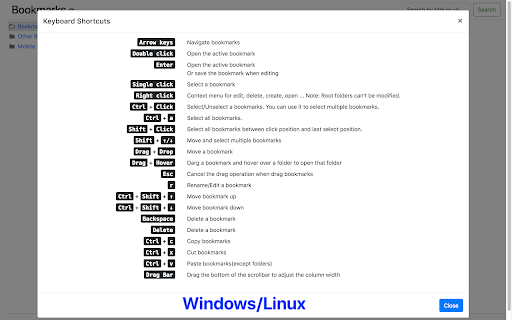
This extension will replace Chrome's default bookmarks manager. It's very useful if you have lots of bookmarks. Similar to Mac Finder in columns view, you can manage and navigate bookmarks by mouse or keyboard shortcuts, for example:
• Navigate all bookmarks using mouse or arrow keys.
• Open a bookmark by double click or enter key.
• Open all bookmarks in a folder by context menu.
• Drag and Drop a bookmark to a new location.
• Create, edit or delete bookmark or folder by context menu.
• Select multi bookmarks to move, delete or open.
• Copy/cut/paste bookmarks(except folders) by shortcuts.
• Sort bookmarks by name.
• Support many keyboard shortcuts.
How to use:
• Click this extension's icon
• Click menu item at Chrome -> Bookmarks -> Bookmark Manager
• Use Chrome keyboard shortcuts, Windows/Linux is Ctrl + Shift + o, Mac is ⌘ + Option + b
Bookmarks menu(in top left menu ▼)
• Switch Dark/Light Theme
• Show keyboard shortcuts or press '?' key
This extension is a part of another extension "Re-newtab" that contains this bookmarks manager in Chrome newtab.



Reviews (2 cached)
★☆☆☆☆2025-07-20
Marcel
Useless, only shows 30 search results and doesn't show the bookmark location. If a search doesn't show all entries, what's the point of the search? It's useless.
★☆☆☆☆2021-06-07
VL
Absolutely useless. Slightly better UI, but no functionality beyond what chrome built in manager provides. Sadly, all this extensions are designed for people who have 10 bookmarks maximum. Simple things are missing. For example, it is not able to search for folders only.
Permissions (3)
Permissions
bookmarksℹ Can read and modify your bookmarks favicon storageℹ Can store data locally in your browser
Details
| Version | 1.0.16 |
| Updated | Apr 30, 2024 |
| Size | 89.45KiB |
| First Seen | Mar 29, 2026 |
More by Jackie(Guokai) Han

Tab Groups Extension
by Jackie(Guokai) Han
100K
★ 4.46
workflow
100K
★ 4.46
workflow

Vertical Tabs in Side Panel
by Jackie(Guokai) Han
100K
★ 4.40
functionality
100K
★ 4.40
functionality

QR Code
by Jackie(Guokai) Han
100K
★ 4.75
tools
100K
★ 4.75
tools

Talking Clock
by Jackie(Guokai) Han
10K
★ 4.39
workflow
10K
★ 4.39
workflow

Clear Site Data
by Jackie(Guokai) Han
10K
★ 4.46
developer
10K
★ 4.46
developer
Popular in functionality

Hola VPN - Your Website Unblocker
by Hola VPN LTD.
5M
★ 4.84
functionality
5M
★ 4.84
functionality

Video Speed Controller
by igrigorik
3M
★ 4.54
functionality
3M
★ 4.54
functionality

SponsorBlock for YouTube - Skip Sponsorships
by Ajay
2M
★ 4.65
functionality
2M
★ 4.65
functionality

OneTab
by OneTab
2M
★ 4.45
functionality
2M
★ 4.45
functionality

VPN Chrome extension - Best VPN by uVPN
by uVPN
900K
★ 4.52
functionality
900K
★ 4.52
functionality
Popular Extensions

Adobe Acrobat: PDF edit, convert, sign tools
by Adobe Inc.
331M
★ 4.40
workflow
331M
★ 4.40
workflow

AdBlock — block ads across the web
by AdBlock
62M
★ 4.48
workflow
62M
★ 4.48
workflow

Grammarly: AI Writing Assistant and Grammar Checker App
by Grammarly
42M
★ 4.50
communication
42M
★ 4.50
communication

Adblock Plus - free ad blocker
by eyeo GmbH
41M
★ 4.39
workflow
41M
★ 4.39
workflow

Chrome Remote Desktop
by Chrome Remote Desktop Release Managers
38M
★ 3.14
workflow
38M
★ 3.14
workflow