
⚠️Requests 2 sensitive permissions ✅Recently updated
Description
Loadmill Test Composer uses AI to generate automated API tests in real-time, right from your browser.
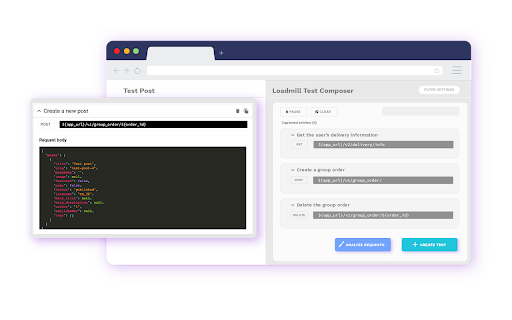
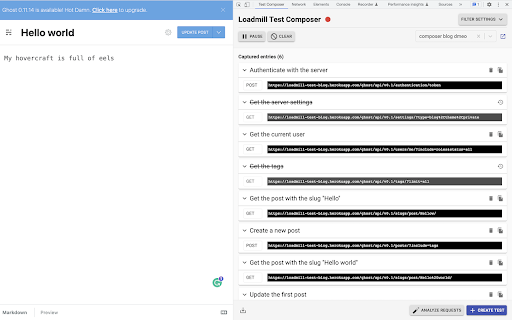
Spend less time creating boilerplate and repetitive test code and more time adding your own insights to your tests. Play a user flow in your app, and Loadmill Test Composer will generate an end-to-end API test script from the API traffic observed in your browser.
How to use Loadmill Test Composer to generate an end-to-end API test:
➤ Click the Loadmill extension icon in Chrome to open the Loadmill side panel
➤ If you are not logged in to Loadmill, you will be prompted to sign in
➤ Click Start and play the user flow you would like to test
➤ Let Loadmill analyze the API requests observed during the flow
➤ When you are done, click Create Test at the bottom
Note for existing users:
Loadmill Test Composer has moved from the Chrome Developer Tools tab to the Chrome side panel.
★ What's new
• Side panel migration: Loadmill Test Composer now opens in Chrome's side panel instead of a DevTools tab
• Updated side panel flow, including better behavior on tab switch, resume, and panel close
• Improved side panel layout and tooltip behavior when zooming out
• Added support for split incognito mode
★ Supported features
• Auto Analyze Mode: Tests can now analyzed and filtered automatically as you record.
• Added an option to revert the AI analysis
• Support for multiple recording profiles (Using different processing algorithms for each)
• Better support for multi-systems testing. Upload HARs to combine recordings from multiple applications into a single test flow
• Test analysis will now use your account algorithm settings
• Improving the ability to hide and obfuscate sensitive values
• No longer clearing the request list after test creation
• Updated UI visuals and Layout
• Adding automated API descriptions
• Filter irrelevant requests from your session in one click
• View WebSocket binary messages in clear text
• WebSocket! WebSocket events are now included in the generated tests.
• Syntax highlighting for JSON
• Showing the request and response body
• Better control on which requests will be filtered out
• Copy a single request and paste it into your Loadmill tests
• Better support for base64 encoded responses
• Create a new test suite by typing its name in the test suite selector bar
Reviews
Loading reviews...
Permissions (6)
Permissions
clipboardWriteℹ Can write to your clipboard debuggerℹ Can use Chrome's debugging protocol on other tabs sidePanel storageℹ Can store data locally in your browser tabsℹ Can see your open tabs and their URLs webRequestℹ Can observe and analyze network traffic
Details
| Version | 0.35 |
| Updated | Mar 13, 2026 |
| Size | 1.81MiB |
| First Seen | Mar 24, 2026 |
Popular in developer

React Developer Tools
by Meta
5M
★ 3.95
developer
5M
★ 3.95
developer

Lighthouse
by lighthouse-extension-owners
1M
★ 4.42
developer
1M
★ 4.42
developer

Контур.Плагин
by kontur.extension
1M
★ 3.11
developer
1M
★ 3.11
developer

Similarweb - Website Traffic & SEO Checker
by Similarweb
1M
★ 4.66
developer
1M
★ 4.66
developer

Clear Cache
by Little Void LLC (Ben Bojko)
1M
★ 4.45
developer
1M
★ 4.45
developer
Popular Extensions

Adobe Acrobat: PDF edit, convert, sign tools
by Adobe Inc.
330M
★ 4.40
workflow
330M
★ 4.40
workflow

Chrome Remote Desktop
by Chrome Remote Desktop Release Managers
38M
★ 3.14
workflow
38M
★ 3.14
workflow

Cisco Webex Extension
by cisco.chromestore
24M
★ 2.34
social
24M
★ 2.34
social

Kami for Google Chrome™
by Kami
17M
★ 4.56
education
17M
★ 4.56
education

Read&Write for Google Chrome™
by Texthelp
17M
★ 3.44
accessibility
17M
★ 3.44
accessibility