
Description
📸 SnapPage Pro - The Ultimate Full Page Screenshot Extension
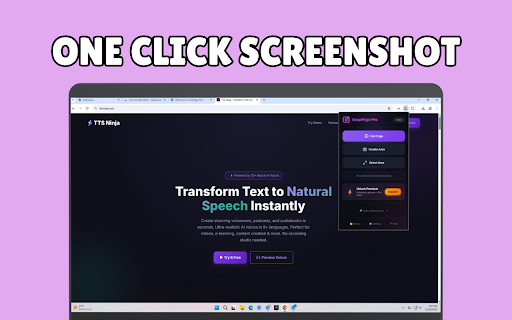
Capture entire web pages in one click. No more scrolling and stitching screenshots manually—SnapPage Pro does it all for you, instantly and perfectly.
✨ WHAT YOU CAN DO
🖼️ Full Page Capture
Capture entire web pages from top to bottom with a single click. Perfect for saving articles, designs, receipts, and documentation.
📐 Custom Area Selection
Need just a portion? Draw a selection box and capture exactly what you need. Great for bug reports, quick shares, and focused screenshots.
👁️ Visible Area Capture
Capture exactly what you see on screen—fast and simple.
🚀 WHY CHOOSE SNAPPAGE PRO?
✅ Lightning Fast - Capture full pages in seconds, not minutes
✅ High Quality - Pixel-perfect screenshots at original resolution
✅ Smart Scrolling - Automatically handles lazy-loaded content
✅ Multiple Formats - Export as PNG, JPEG, or PDF
✅ Built-in Editor - Annotate, crop, and enhance your screenshots
✅ Screenshot History - Access your recent captures anytime
✅ Works Everywhere - Compatible with virtually any website
✅ Privacy First - Your screenshots stay on your device
⚡ PRO FEATURES
- Unlimited screenshots (Free: 25/day)
- JPEG & PDF export
- Advanced annotation tools
- Browser mockup frames
- Watermark support
- Numbered step stamps
- Priority support
🎯 PERFECT FOR
- Designers saving website inspiration
- Developers documenting bugs and features
- Marketers capturing competitor pages
- Students saving research materials
- Professionals archiving important documents
- Anyone who needs better screenshots
⌨️ KEYBOARD SHORTCUTS
Alt+Shift+F → Capture Full Page
Alt+Shift+V → Capture Visible Area
Alt+Shift+S → Select Area
🔒 PRIVACY & SECURITY
SnapPage Pro respects your privacy:
- No data collection or tracking
- Screenshots processed locally on your device
- Only requests necessary browser permissions
- Open and transparent privacy policy
💬 SUPPORT
Questions or feedback? We're here to help!
📧 support@snappage.pro
🌐 https://snappage.pro/contact
Start capturing better screenshots today. Install SnapPage Pro now—it's free to get started!


Reviews
Loading reviews...
Permissions (5)
Permissions
activeTabℹ Can access the current tab when you click the extension downloadsℹ Can manage and monitor downloads scriptingℹ Can inject scripts into web pages storageℹ Can store data locally in your browser tabsℹ Can see your open tabs and their URLs
Details
| Version | 1.0.1 |
| Updated | Dec 26, 2025 |
| Size | 270KiB |
| First Seen | Mar 25, 2026 |
Popular in developer

React Developer Tools
by Meta
5M
★ 3.95
developer
5M
★ 3.95
developer

Lighthouse
by lighthouse-extension-owners
1M
★ 4.42
developer
1M
★ 4.42
developer

Контур.Плагин
by kontur.extension
1M
★ 3.11
developer
1M
★ 3.11
developer

Similarweb - Website Traffic & SEO Checker
by Similarweb
1M
★ 4.66
developer
1M
★ 4.66
developer

Clear Cache
by Little Void LLC (Ben Bojko)
1M
★ 4.45
developer
1M
★ 4.45
developer
Popular Extensions

Adobe Acrobat: PDF edit, convert, sign tools
by Adobe Inc.
330M
★ 4.40
workflow
330M
★ 4.40
workflow

Chrome Remote Desktop
by Chrome Remote Desktop Release Managers
38M
★ 3.14
workflow
38M
★ 3.14
workflow

Cisco Webex Extension
by cisco.chromestore
24M
★ 2.34
social
24M
★ 2.34
social

Kami for Google Chrome™
by Kami
17M
★ 4.56
education
17M
★ 4.56
education

Read&Write for Google Chrome™
by Texthelp
17M
★ 3.44
accessibility
17M
★ 3.44
accessibility