
⚠️Not updated in over 2 years
Description
With this extension, you can transform one of your passwords into a new one more robust against brute-force attacks, without the inconvenience of having to remember a longer, more complicated password.
How does it work?
Suppose you want to create an account on a website:
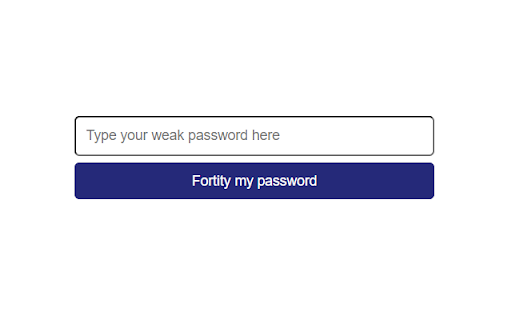
- click on the extension icon ;
- enter a password in the form that appears ;
- click on the "Fortify password" button ;
- wait a few seconds ;
- copy the fortified password shown below ;
- and paste it into the website registration form.
REMEMBER THE PASSWORD YOU PASSED INTO THE EXTENSION FORM (not the fortified password). Later, each time you want to log in to your newly created account, you'll need to retype your password in the extension form, regenerate the fortified password, then paste it into the site authentication form.
NO PASSWORD IS STORED ON YOUR MACHINE OR ELSEWHERE. MAKE SURE YOU REMEMBER THE PASSWORD YOU TYPED INTO THE EXTENSION FORM, AS IT'S NOT STORED ANYWHERE. THIS EXTENSION IS NOT A PASSWORD MANAGER.
THIS EXTENSION GIVES NO MINIMUM GUARANTEE OF SECURITY, AND IT'S UP TO YOU TO FULLY UNDERSTAND WHAT'S GOING ON BEHIND THE SCENES (READ A BRIEF EXPLANATION BELOW).
How does it work inside?
We use a "key-streching" method to create, from one password, a new password more robust against brute-force attacks. No password is stored on your machine or on a remote server. The same password will always generate the same fortified password (our algorithm is deterministic).
Let's take an example:
To brute force guess a 10-character password (containing only lower-case letters), an attacker would have to test around 26^10 combinations before hoping to obtain the correct password. Let's assume that the attacker can test 10^13 passwords per second (for the technically minded: this speed seems to match what a €1,500 hardware specializing in SHA-256 can provide as of June 2023). It will then take around 14 seconds to guess your 10-character password (26^10 / 10^13).
But if we can multiply by 1 million the time an attacker takes to test a single password, he won't take 14 seconds but 5 months to guess your password. That's all well and good, but how do you actually increase the time taken for each test? That's where "key-stretching" comes in: simply put your password through a series of time-consuming transformations. Instead of testing "12345" directly, the attacker must first transform "12345" with our (lengthy) algorithm and then test the algorithm's result. For someone who actually knows the password (you), waiting 1 second instead of a microsecond is almost imperceptible. But for someone testing billions and billions of passwords (an attacker), this time difference is much more visible.
These calculations are examples intended for understanding: the additional difficulty (for the attacker) created by this password fortification will depend on a huge number of circumstances, changing from one website to another, making it impossible to calculate even an order of magnitude.
Warning:
- Obviously, if your password is extremely simple, and is one of the passwords first tested by attackers (e.g. "12345" or "password"), then this extra difficulty won't bother the attacker much, and your fortified password will still be guessed in no time (a million times nothing still isn't much). So keep using strong passwords.
- Our algorithm is deterministic: the same password will always generate the same fortified password. So, if you reuse the same passwords from one site to another, and an attacker manages to guess it on one site, he'll always be able to reuse it on the others. So keep diversifying your passwords.

Reviews
Loading reviews...
Details
| Version | 0.0.2 |
| Updated | Jun 16, 2023 |
| Size | 55.01KiB |
| First Seen | Mar 27, 2026 |
Popular in developer

TouchEn PC보안 확장
by 라온시큐어
8M
★ 1.33
developer
8M
★ 1.33
developer

React Developer Tools
by Meta
5M
★ 3.95
developer
5M
★ 3.95
developer

WhatFont
by Chengyin Liu
3M
★ 4.01
developer
3M
★ 4.01
developer

Take Webpage Screenshots Entirely - FireShot
by Evgeny Vokilsus
3M
★ 4.79
developer
3M
★ 4.79
developer

Wappalyzer - Technology profiler
by Wappalyzer
3M
★ 4.56
developer
3M
★ 4.56
developer
Popular Extensions

Adobe Acrobat: PDF edit, convert, sign tools
by Adobe Inc.
331M
★ 4.40
workflow
331M
★ 4.40
workflow

Grammarly: AI Writing Assistant and Grammar Checker App
by Grammarly
42M
★ 4.50
communication
42M
★ 4.50
communication

Chrome Remote Desktop
by Chrome Remote Desktop Release Managers
38M
★ 3.14
workflow
38M
★ 3.14
workflow

Microsoft Single Sign On
by Microsoft
36M
★ 2.27
workflow
36M
★ 2.27
workflow

Cisco Webex Extension
by cisco.chromestore
23M
★ 2.34
social
23M
★ 2.34
social