
Teams and BlueJeans Closer
v3.0 Updated May 28, 2021 8.3KiB
⚠️Not updated in over 2 years
Description
This extension closes the unwanted tabs that are opened when users click on links to objects in Microsoft Teams with Desktop Application installed. It supports both Professional Teams and Personal Teams installations.
Technical Description
When users click links to access objects in The Microsoft Teams Application, the link opens a page starting with the address https://teams.microsoft.com/dl/launcher/launcher.html? or https://teams.live.com/dl/launcher/launcher.html. Each time a link is clicked, a fresh browser tab is opened. This link then launches the Teams Desktop Application and displays the required content. These launcher tabs remain open in your browser. Microsoft Edge and other browsers will put these tabs to sleep, but do not close them, so users soon have multiple tabs open with no useful content. This app closes the unwanted launcher tabs after the Teams Application has opened.
The tool operates with any link to Teams (Professional or Personal) content, including Links to Tabs, Links to Individual Files, and Links to Objects such as WiKi pages or Tasks. Prior to Office 20-02, Outlook meetings invites also would open this unwanted Tab. Although this was fixed in later versions of office, users accessing Teams from older versions of Windows will still experience this issue. This extension closes these links as well.
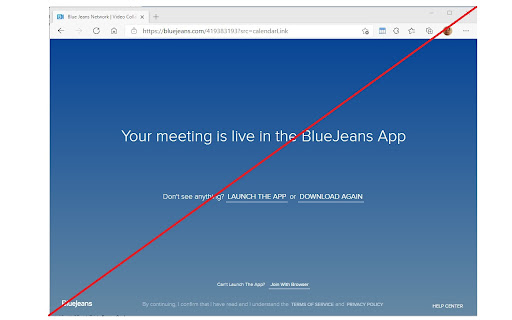
As a side benefit this extension also closes BlueJeans launcher tabs that are opened whenever a BlueJeans meeting is launched.
Operation
If the Teams Desktop application is not installed, this extension should be disabled by switching it off from the Extension Control page.
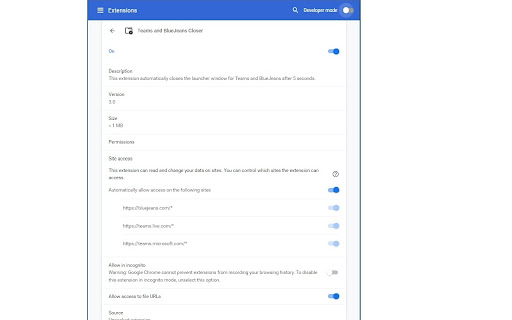
If you wish to disable Closer for one type of Teams installation, disable it on the Extension Control Page by sliding the default on switch to off. See the third image for details of how this looks in Chrome.
Edge for Business does not support extension site detection so to disable Closer on a particular site, you should change the Site Access to 'On Specific Sites' and enter in the sites where you wish Closer to operate.
Applicability
This extension operates will all Chromium based browsers. It has been tested on Chrome and Edge for Business. It will operate on any Chromium based browser able to read Manifest version 3.0
Version Information
Version 2.0 - First public release with instructions
Version 3.0 - Added support for Personal Teams installations

Reviews
Loading reviews...
Details
| Version | 3.0 |
| Updated | May 28, 2021 |
| Size | 8.3KiB |
| First Seen | Mar 27, 2026 |
Popular in workflow

Adobe Acrobat: PDF edit, convert, sign tools
by Adobe Inc.
331M
★ 4.40
workflow
331M
★ 4.40
workflow

Chrome Remote Desktop
by Chrome Remote Desktop Release Managers
38M
★ 3.14
workflow
38M
★ 3.14
workflow

Microsoft Single Sign On
by Microsoft
36M
★ 2.27
workflow
36M
★ 2.27
workflow

MetaMask
by metamask
13M
★ 2.68
workflow
13M
★ 2.68
workflow

Microsoft Power Automate
by Microsoft Corporation
10M
★ 1.99
workflow
10M
★ 1.99
workflow
Popular Extensions
Adobe Acrobat: PDF edit, convert, sign tools
by Adobe Inc.
331M
★ 4.40
workflow
331M
★ 4.40
workflow

Grammarly: AI Writing Assistant and Grammar Checker App
by Grammarly
42M
★ 4.50
communication
42M
★ 4.50
communication
Chrome Remote Desktop
by Chrome Remote Desktop Release Managers
38M
★ 3.14
workflow
38M
★ 3.14
workflow
Microsoft Single Sign On
by Microsoft
36M
★ 2.27
workflow
36M
★ 2.27
workflow

Cisco Webex Extension
by cisco.chromestore
23M
★ 2.34
social
23M
★ 2.34
social