
⚠️Not updated in over a year ⚠️Requests 1 sensitive permission
Description
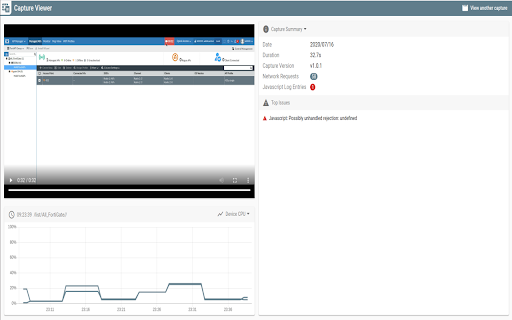
This extension allows for capturing detailed debug information of a FortiManager/FortiAnalyzer's graphical user interface. Requires FortiManager/FortiAnalyzer 6.4.0 GA or greater.
How to use this tool:
1. For capturing:
a. Login to any FortiManager/FortiAnalyzer that is later than 6.4.0 GA, this extension color will turn blue (activated).
b. Click this extension and select "New Capture"
c. update the file name and select "Start Capture"
d. FortiManager/FortiAnalyzer should prompt for permission, select "OK" to start capturing debug information.
e. A red record icon appears in the FortiManager/FortiAnalyzer toolbar.
f. After finishing your operation, click the record icon to stop and download the captured zip file.
2. For viewing:
a. Open this extension and select "View Existing Capture".
b. Open the captured zip file in the newly opened viewer tab.
c. Start the video to view the operation and different captured information.
Reviews
Loading reviews...
Permissions (6)
Permissions
downloadsℹ Can manage and monitor downloads managementℹ Can manage other installed extensions offscreensystem.cpusystem.memory tabCaptureℹ Can capture tab audio/video
Details
| Version | 2.0.2 |
| Updated | Aug 22, 2024 |
| Size | 591KiB |
| First Seen | Mar 29, 2026 |
More by Fortinet


Popular in developer

GoFullPage - Full Page Screen Capture
by GoFullPage
10M
★ 4.89
developer
10M
★ 4.89
developer

TouchEn PC보안 확장
by 라온시큐어
8M
★ 1.33
developer
8M
★ 1.33
developer

React Developer Tools
by Meta
5M
★ 3.95
developer
5M
★ 3.95
developer

Meta Pixel Helper
by Meta
4M
★ 3.91
developer
4M
★ 3.91
developer

ColorZilla
by colorzilla.com
4M
★ 4.59
developer
4M
★ 4.59
developer
Popular Extensions

Adobe Acrobat: PDF edit, convert, sign tools
by Adobe Inc.
331M
★ 4.40
workflow
331M
★ 4.40
workflow

Grammarly: AI Writing Assistant and Grammar Checker App
by Grammarly
42M
★ 4.50
communication
42M
★ 4.50
communication

Chrome Remote Desktop
by Chrome Remote Desktop Release Managers
38M
★ 3.14
workflow
38M
★ 3.14
workflow

Microsoft Single Sign On
by Microsoft
36M
★ 2.27
workflow
36M
★ 2.27
workflow

Cisco Webex Extension
by cisco.chromestore
23M
★ 2.34
social
23M
★ 2.34
social