
⚠️Requests 1 sensitive permission
Description
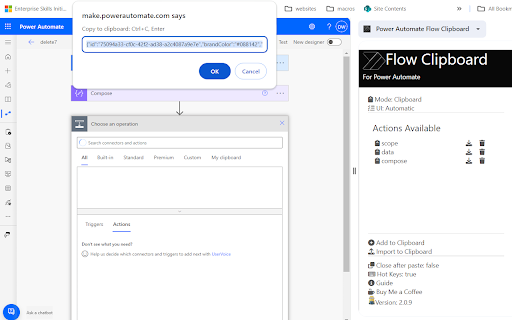
Save any action (including nested containers in Classic) to our own clipboard. Then add to any of your Power Automate flows.
Export actions to your device, send to others who can then import them.
Review all actions and inputs contained within the clipboard item.
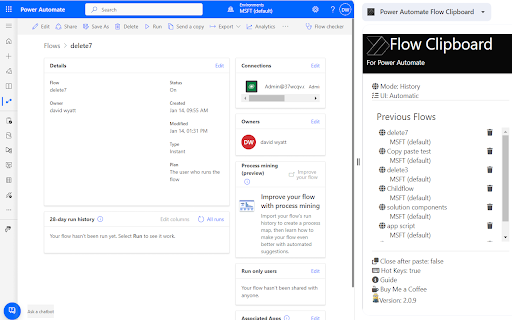
History - lists all previous flows you have edited
Force Power Automate to always load in Classic UI mode
Now works with New UI
How to use-
Saving to Clipboard
-Copy action to clipboard
-Open Flow Clipboard
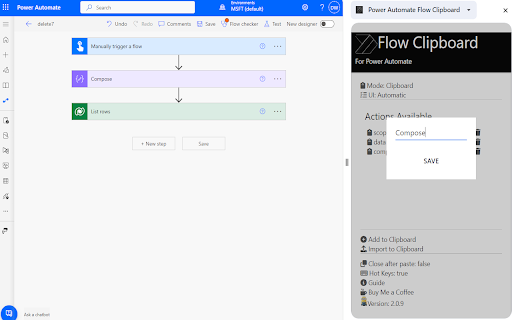
-Add
-Name save
Add to flow
-Open Flow
-Open Flow Clipboard
-Click required action name
-Press enter after pop up (Classic Only)
Hot Keys
-Alt+c Adds last added action
-Alt+s saves flow
-Alt+c opens checker
-Alt-z undo (Classic Only)
-Alt-t tests flow with last flow in history
-Alt+q switch to edit (if in run log)
-Alt-x toggle copilot (New UI Only)


Reviews
Loading reviews...
Permissions (5)
Permissions
sidePanel storageℹ Can store data locally in your browser tabsℹ Can see your open tabs and their URLs unlimitedStorage webRequestℹ Can observe and analyze network traffic
Details
| Version | 3.0.10 |
| Updated | Feb 7, 2026 |
| Size | 10.09MiB |
| First Seen | Mar 22, 2026 |
More by Power DevBox

Popular in developer

Lighthouse
by lighthouse-extension-owners
1M
★ 4.42
developer
1M
★ 4.42
developer

Контур.Плагин
by kontur.extension
1M
★ 3.11
developer
1M
★ 3.11
developer

Similarweb - Website Traffic & SEO Checker
by Similarweb
1M
★ 4.66
developer
1M
★ 4.66
developer

Clear Cache
by Little Void LLC (Ben Bojko)
1M
★ 4.45
developer
1M
★ 4.45
developer

SEO META in 1 CLICK
by Bilal Hadri
900K
★ 4.87
developer
900K
★ 4.87
developer
Popular Extensions

Adobe Acrobat: PDF edit, convert, sign tools
by Adobe Inc.
330M
★ 4.40
workflow
330M
★ 4.40
workflow

Chrome Remote Desktop
by Chrome Remote Desktop Release Managers
38M
★ 3.14
workflow
38M
★ 3.14
workflow

Cisco Webex Extension
by cisco.chromestore
24M
★ 2.34
social
24M
★ 2.34
social

Kami for Google Chrome™
by Kami
17M
★ 4.56
education
17M
★ 4.56
education

Read&Write for Google Chrome™
by Texthelp
17M
★ 3.44
accessibility
17M
★ 3.44
accessibility