Export History/Bookmarks to JSON/CSV*/XLS* icon

Export History/Bookmarks to JSON/CSV*/XLS*

by json-xls.com

v2.6 Updated Aug 13, 2024 21.82KiB
CWS
20K
Users
★ 3.14
71 reviews
#758
of 42.2K
workflow
#235 of 5.2K
⚠️Not updated in over a year ⚠️Requests 1 sensitive permission

Description

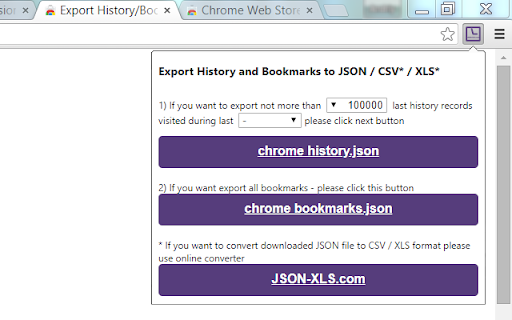
Save Chrome history and bookmarks as JSON files. Click on 'Chrome History.json' or 'Chrome Bookmarks.json' button to download JSON file with your browser history/bookmarks. Also extension allows to transform original history JSON file exported with Google Takeout. If you want to convert downloaded JSON file to CSV/XLS/XLSX format please use online converter https://www.JSON-XLS.com/json2xls. NOTICE: This extension doesn't export history or bookmarks into CSV or Microsoft Excel Binary File Format (.xls) file. Any JSON file can be converted to CSV/XLS/XLSX format at https://json-xls.com/. ----------- v2.6: - Added link to 'Google Takeout' page. - Added button to transform 'Google Takeout' history json file (remove metadata information). v2.4: - Added 'no limit' options for customer. But please remember that Chrome limitations (not more than 3 months) are still primary. v2.3: - Changed maximum period due to Chrome limitations (not more than 3 months). v2.2: - Fixed downloading bookmarks (invalid 'Added date'). v2.1: - Fixed download on second attempt. v2.0: - Fixed download if "Ask where to save each file before downloading" is Checked in Chrome's Settings v1.9: - JSON files have been formatted! v1.8: - Extension requires 'Manage your downloads' permission (for Chrome v65.0.3325.181 or later)! v1.6: - Two new limits were added for history records: 100K and 500K! v1.4: - Allows to limit number of history records! v1.3: - CSV/TSV formats are available! v1.2: - human readable format for date/time stamp!
Export History/Bookmarks to JSON/CSV*/XLS* screenshot 1

Reviews (16 cached)

★☆☆☆☆2020-04-02
Dilip Kushwaha

Doesn't work.

★☆☆☆☆2019-12-30
Dewdzilla McManzee

Useless non-functional junk. Just want a simple way to export & restore cookies, like from different portable Chromes & combine them, same way IE & Firefox & other real browsers always can =)

★☆☆☆☆2019-11-04
Danial Shaikh

THIS APP JUST DOESNT WORK. REDIRECTS TO ANOTHER CONVERTER FILE AND YES, MY CHROME IS TOTALLY UPDATED. COMPLETE WASTE OF TIME! NOT EVEN SURE MY CHROME BOOKMARKS AND HISTORY IS SAFE OR THIS SCAM CHROME EXTENSION HAS JUST TAKEN EVERYTHING AWAY! EXTREMLY DISAPPOINTED!

★☆☆☆☆2019-02-23
Marina Oliveira de Melo

Ok, I got exported my history, but now how to import?

★☆☆☆☆2018-08-21
Tony Puglisi

does not save file, forces page redirect to json converter

★☆☆☆☆2018-05-27
Heymr Paul

Brings you to a page so you can upload it to a converter. Gave me no results and showed me no file. It only brings you to this page to make you download yet another piece of software. What kind of software and what spyware is in it is anyones guess. AVOID THIS ENTIRELY.

★☆☆☆☆2018-01-08
Janardan Misra

Junk!

★☆☆☆☆2017-11-28
David C

Doesn't work

★☆☆☆☆2017-09-25
aymen opa

Your rating: Hated it

★☆☆☆☆2017-02-12
charlene gardiner

Lazy

★☆☆☆☆2016-05-20
Russell Ridge

Doesn't disclose very limited export unless you subscribe

★★☆☆☆2024-06-05
Tijana Salaj

cannot export in zip properly or convert to CSV --- it asks you for an upgrade and only option is json url. Disappointed!

★★☆☆☆2019-11-17
Truong Ha

I Cant download json file

★★★☆☆2020-09-25
Subramanya Adiga

I have exported my bookmarks to json file from google chrome. Is there anyway to import it back to chrome with the same json? I have changed my machine and want to switch to new one.

★★★☆☆2019-08-26
Robert DuWors

"Extension requires 'Manage your downloads' permission" Rather than snark over and over, explain how to do it! Not obvious.

★★★☆☆2018-10-10
Mati Roy

I like it except it limits to the last 500,000 history records.

Permissions (3)

Permissions

bookmarks Can read and modify your bookmarks downloads Can manage and monitor downloads history Can read and modify your browsing history

Details

Version 2.6
Updated Aug 13, 2024
Size 21.82KiB
First Seen Mar 22, 2026


