
⚠️Not updated in over 2 years
Description
⬇️Easy to set up ⬇️:
1. 🆓 and very easy to operate.
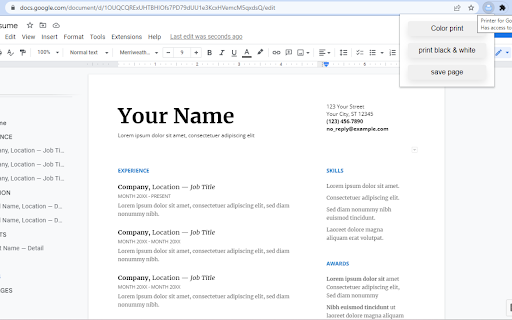
2. Place a print 🖨 button inside your web browser. So you can easily print a page with one click.
3. Choose the style and the Print button design. 🖨(color, black and white)
4. Double-click on the print icon 🖨 to save the file in HTML or PDF, or to open the Options page.
✨Features ✨:
1. Choose between the regular Print button or the Material Design Print button.
2. Or customize your own design Print button.
3. Supports both the TOUCH screen 🖥and DESKTOP screens with the mouse.🖱
4. Print button works for Windows, Mac, Linux, and Google Chromebooks.
Our extension lets you print faster the opened tab on your current browser with one single click.

Reviews (2 cached)
★☆☆☆☆2023-09-25
Mark S.
Nothing happens, uninstall.
★☆☆☆☆2023-04-27
Chris Vydas
Nothing happens
Permissions (1)
Permissions
storageℹ Can store data locally in your browser
Details
| Version | 1.0.1 |
| Updated | Oct 9, 2022 |
| Size | 15.38KiB |
| First Seen | Mar 22, 2026 |
Popular in developer

Lighthouse
by lighthouse-extension-owners
1M
★ 4.42
developer
1M
★ 4.42
developer

Контур.Плагин
by kontur.extension
1M
★ 3.11
developer
1M
★ 3.11
developer

Similarweb - Website Traffic & SEO Checker
by Similarweb
1M
★ 4.66
developer
1M
★ 4.66
developer

Clear Cache
by Little Void LLC (Ben Bojko)
1M
★ 4.45
developer
1M
★ 4.45
developer

SEO META in 1 CLICK
by Bilal Hadri
900K
★ 4.87
developer
900K
★ 4.87
developer
Popular Extensions

Adobe Acrobat: PDF edit, convert, sign tools
by Adobe Inc.
330M
★ 4.40
workflow
330M
★ 4.40
workflow

Chrome Remote Desktop
by Chrome Remote Desktop Release Managers
38M
★ 3.14
workflow
38M
★ 3.14
workflow

Cisco Webex Extension
by cisco.chromestore
24M
★ 2.34
social
24M
★ 2.34
social

Kami for Google Chrome™
by Kami
17M
★ 4.56
education
17M
★ 4.56
education

Read&Write for Google Chrome™
by Texthelp
17M
★ 3.44
accessibility
17M
★ 3.44
accessibility