
Description



Reviews (28 cached)
I have the extension connected to my phone. Every time I access a username, password, or anything in the extension, I am forced to approve it on my phone. This is untenable.
bad
This extension uninstalls itself every single week.
On Ubuntu 24 the extension refuses to connect with the Ubuntu JPM Desktop app. As a user I expect feature parity between Windows, macOS, and Linux.
Autofill does not work and request approval on every password use.
Feb 2025 and it STILL doesn't work! This is by far the worst password manager I have ever used. If your organization is moving to this ring all the alarms that you can. 1. Autofill is broken. I have it enabled it just doesn't do anything. 2. You can not update your passwords easily. - Rarely I can update with the extension automatically when updating a password via the site's web form - That usually fails so I try it in the extension directly - If that fails, which is often, I try it with the companion app - When that fails, which is often, I have to fully restart the companion app and even that is not consistent. 3. It requires a companion app on your desktop itself, a companion app that can't do its one job somehow. 4. The companion app is Intel based, while the rest of jumpcloud and Apple themselves have moved on to ARM. Just why? 5. It locks up a non-trivial amount of websites. 1 in 4 easily. I am using an M3 Pro MAX and it makes the machine sluggish, disrupts my workflow, and in general is something else I have to fight throughout the day when I just want to get work done. My colleagues with older machines have it much worse than me, and I do not have it good. Run away! You will either have to suffer in silence or break your organization's password policy just to get work done. Not a good look for a paid product!
Doesn't function as intended, have the desktop app setup and I can't connect the extension. It's an absolute trainwreck of a program, total trash.
I gave another star to make it two stars like Adrian Muresan
Every day feels like playing roulette to see if the extension works or not that day.
The worst performing extension in browser ever. I'd rather write passwords on a sheet of paper and write them by hand every time.
guys, you have to fix this its bringing down my entire browser
The brave browser extension cannot communicate with the desktop app. Also, terrible experience in other browsers where it does work.
This is the worst software I've seen in 40 years. It taints the reputation of your main product. I'm completely disabled this morning due to an update.
Broken. The UI won't even open when you click on it. Always buggy to the point of breaking, like it's doing right now. I'm a little surprised how much Jumpcloud doesn't care about it's customers or addressing these reviews and concerns on their product. What happened to QA?
Overall JumpCloud has been very good with the notable exception of their password manager (PWM) application. Frankly the experience with PWM has been ridden with bugs and software that simply does not work well. For example, sharing credentials to groups often fails to work, password updates don't sync between devices, the app crashes frequently, etc.. JumpCloud clearly brought this product to market too early IMO and needs to revisit this decision and make this product work much better. Coming from BitWarden, this was a huge downgrade.
Avid Jumpcloud fan. Switched because of the lastpass breach. This, frankly, is terrible. Have been trying to work with support to resolve our issues, but they seem both reluctant to accept there are issues, and reluctant to proactively do anything about it. In short, the popup dialog that appears on the UN/Password fields is unstable (i.e., we have multiple users that have it flashing on and off, and are unable to click on it). The user experience in frankly a disaster. 100% of our team, disapprove of the app. We are considering moving to another platform now again, because Jumpcloud are not making progress in our view. Be very carful about backups, and having multiple clients installed. The way its designed, there is no backup copy of your passwords in the cloud. The system relies on you managing backups, and having multiple installations. If you dont have backups, and you loose a device, your passwords are gone.
This is positively the worst User Experience I've ever had with a password manager, I had thought LastPass was bad. My organisation punted us off 1Password onto Jumpcloud so they could save a few bucks. The desktop app startup time is horrific, go make yourself a cuppa while you wait for it to chug up. Finding passwords is clunky, the UI popups made by the chrome extension are custom instead of using system notifications so it's downright weird looking. The injected dom Icons into your password fields are ugly as sin. In the app itself you can't have multiple hidden fields in a password record. The list goes on. Avoid. Use Bitwarden if your compliance department allow, it's leagues ahead of this awful product, and to it's also open source.
About a week after migrating all my passwords from LastPass to my Mac (work machine), phone, & PC, Jumpcloud dumped all my passwords off my Mac. The backups were worthless. How is the Jumpcloud application unable to open a Jumpcloud file extension, which your own app created?! Not a huge deal, I was still able to pull the passwords from my phone for that day. The following day I attempted a reinstall of the manager on my Mac. This somehow wiped all the passwords from my phone. My PC is now my last hope. If the passwords get wiped from there somehow, all hope is lost. My Mac is now in a state where the browser extensions are not working and every morning it somehow forgets the passwords I added the day before. This is absolutely excruciating after migrating from LastPass.
I have to agree with the other reviews, Jumpcloud is great, but their password manager is no good!
Big fan of JumpCloud directory service, but unfortunately this extension is completely useless as it keeps saving passwords but would not fill in the login forms. I really hope they at least get to the start line soon, but they should've not launched this product yet.
Tends to eat up a lot of a memory and cause the page to crash sometimes on Linux.
The only reason I gave two stars is that in my country when we offer flowers to the dead, they are given in even numbers.
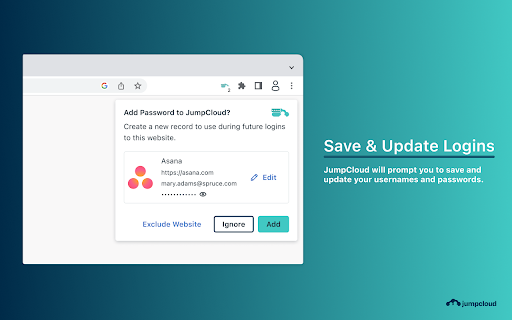
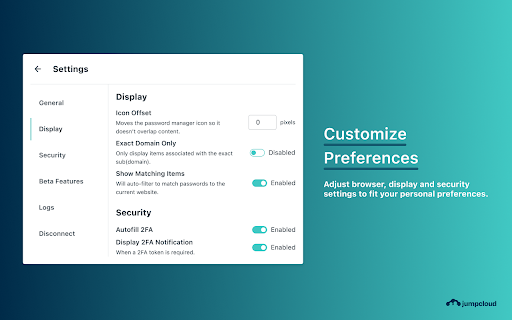
Everytime I visit stackoverflow it gives me a "generate password" popup even though there is no password form on the page. There is no way to disable this popup in the settings.
I love JumpCloud and ALMOST everything they do. The Password Manager is the "Ford Pinto" of their product offerings. I'm using the free level, otherwise I wouldn't use it at all. At free, it's still too expensive. You have to work so hard to get your information and, in the instance of payment cards, once you get the card number, it closes, then you have to go hunt for it again to get the CVV, and if you forgot the expiration date, well, go through the pain again. It has potential, but right now it seriously fails to capitalize on the skills and abilities of the JumpCloud expertise and experience.
This was updated and it sucks now. Luckily the Desktop app is still the old version. Now all the icons are the same color so it's more of an indistinguishable mess, if i opened it before it was able to know what page i was on and show me the possible login info for that page, now i have to look for it when i open it since it just shows me all the passwords i have saved. Both design and functionality updates made this worse, essentially they decided, if it ain't broke we'll break it.
Not ready for primetime.
While the extension theoretically supports TOTP, it does not allow you to view or copy, let alone auto-fill, a TOTP in an auth workflow that requires only a TOTP code (e.g. need to reauthenticate without providing a password, as is _constantly_ happening with JumpCloud itself so they oughtta know about this workflow). In such cases I need to re-activate the app, then switch to the app, manually search for the site I need the TOTP for, and copy from there. The extension has an overly agressive "hey you want to review this field that you typed in" feature. I appreciate queueing these up instead of interrupting me in the moment, but I am repeatedly having to clear this queue from fields that I have no intention of adding to JumpCloud. There's also no bulk dismiss, and I have to clear these items one at a time.
Unable to connect to desktop app since update. Not working.
Permissions (10)
Permissions
Details
| Version | 2.5.8 |
| Updated | Feb 27, 2026 |
| Size | 11.69MiB |
| First Seen | Mar 22, 2026 |
Popular in workflow





Popular Extensions


