
⚠️Not updated in over 2 years ⚠️Requests 1 sensitive permission
Description
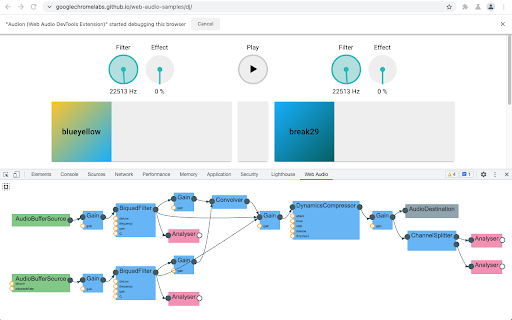
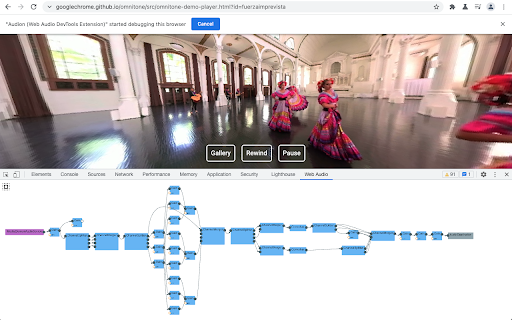
Audion is a Chrome extension that adds a Web Audio panel to Developer Tools. This panel visualizes the web audio graph in real-time.
How to use:
1. Install the extension from Chrome Web Store.
2. Open Chrome Developer Tools. You should be able to find “Web Audio” panel in the top. Select the panel.
3. Visit or reload a page that uses Web Audio API. If the page is loaded before opening Developer Tools, you need to reload the page for the extension to work correctly.
4. You can pan and zoom with the mouse and wheel. Click the “autofit” button to fit the graph within the panel.
Visit GitHub to follow this project, report issues, and contribute: https://github.com/GoogleChrome/audion


Reviews (2 cached)
★☆☆☆☆2025-01-27
Ricardo Zacarias
Does not seem to work anymore
★★★☆☆2017-11-13
Marc Breuer
It looks like it could be good with only a few nodes. Unfortunately I have a lot and it pretty much crashed. Not going with 1 star, as I am sure it's a good tool for some, but not my use case. I have so many nodes, I can't even zoom in enough to read what it says on the node visualization.
Permissions (1)
Permissions
debuggerℹ Can use Chrome's debugging protocol on other tabs
Details
| Version | 3.0.9 |
| Updated | Aug 18, 2023 |
| Size | 217KiB |
| First Seen | Mar 28, 2026 |
Popular in developer

TouchEn PC보안 확장
by 라온시큐어
8M
★ 1.33
developer
8M
★ 1.33
developer

React Developer Tools
by Meta
5M
★ 3.95
developer
5M
★ 3.95
developer

WhatFont
by Chengyin Liu
3M
★ 4.01
developer
3M
★ 4.01
developer

Take Webpage Screenshots Entirely - FireShot
by Evgeny Vokilsus
3M
★ 4.79
developer
3M
★ 4.79
developer

Wappalyzer - Technology profiler
by Wappalyzer
3M
★ 4.56
developer
3M
★ 4.56
developer
Popular Extensions

Adobe Acrobat: PDF edit, convert, sign tools
by Adobe Inc.
331M
★ 4.40
workflow
331M
★ 4.40
workflow

Grammarly: AI Writing Assistant and Grammar Checker App
by Grammarly
42M
★ 4.50
communication
42M
★ 4.50
communication

Chrome Remote Desktop
by Chrome Remote Desktop Release Managers
38M
★ 3.14
workflow
38M
★ 3.14
workflow

Microsoft Single Sign On
by Microsoft
36M
★ 2.27
workflow
36M
★ 2.27
workflow

Cisco Webex Extension
by cisco.chromestore
23M
★ 2.34
social
23M
★ 2.34
social