
⚠️Not updated in over a year
Description
Copy any network request as a cURL command line.
As we all know, the DevTools of Chrome browser include a Network panel.
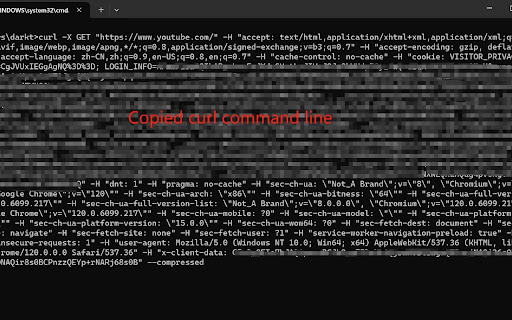
In the network panel, users can right-click on each network request and select the copy as cURL menu to copy the network request as a curl command.
This feature works fine when users use MacOS or Linux.
Unfortunately, when users use Windows, this feature doesn't work properly, because Windows doesn't support command parameters surrounded by single quotes.
Using this extension can solve this problem.
How to use it ?
Step 1. User can open chrome DevTools, and select 'cURL' panel.
Step 2. User browser web page, then the 'cURL' panel will list every request made by the browser.
Step 3. In the cURL panel, click the copy button in front of any request.
The perfect curl command line will be copied to the system clipboard :-)

Reviews
Loading reviews...
Permissions (1)
Permissions
clipboardWriteℹ Can write to your clipboard
Details
| Version | 0.7 |
| Updated | Jun 6, 2024 |
| Size | 13.25KiB |
| First Seen | Mar 22, 2026 |
Popular in developer

Lighthouse
by lighthouse-extension-owners
1M
★ 4.42
developer
1M
★ 4.42
developer

Контур.Плагин
by kontur.extension
1M
★ 3.11
developer
1M
★ 3.11
developer

Similarweb - Website Traffic & SEO Checker
by Similarweb
1M
★ 4.66
developer
1M
★ 4.66
developer

Clear Cache
by Little Void LLC (Ben Bojko)
1M
★ 4.45
developer
1M
★ 4.45
developer

SEO META in 1 CLICK
by Bilal Hadri
900K
★ 4.87
developer
900K
★ 4.87
developer
Popular Extensions

Adobe Acrobat: PDF edit, convert, sign tools
by Adobe Inc.
330M
★ 4.40
workflow
330M
★ 4.40
workflow

Chrome Remote Desktop
by Chrome Remote Desktop Release Managers
38M
★ 3.14
workflow
38M
★ 3.14
workflow

Cisco Webex Extension
by cisco.chromestore
24M
★ 2.34
social
24M
★ 2.34
social

Kami for Google Chrome™
by Kami
17M
★ 4.56
education
17M
★ 4.56
education

Read&Write for Google Chrome™
by Texthelp
17M
★ 3.44
accessibility
17M
★ 3.44
accessibility